The PNT Y/N Field(s) Set From List alarm calculation uses one of the three calculation types listed below to monitor a list of user provided PNT Boolean attributes by name in the reference bits for the calculation type.
These alarm calculation types can only be implemented with the CygNet Enhanced Point Scheme.
Note: The CygNet Enhanced Point Scheme is available as a separately licensed entity. See Understanding the CVS Metadata File for more information about the elements and attributes that define the CygNet Enhanced Point Scheme.
For more information, see Alarm Calculation Types and PNT Boolean Attributes.
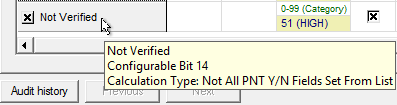
The following image shows the area of an Analog Alarm Settings page of a PNT Editor with an enabled Not Verified alarm using the Not All PNT Y/N Fields Set From List (NOT_ALL_PNT)calculation type.
There are no calculation parameters for these calculation types. Instead, the user lists the Boolean attributes to be used for the calculation in the Reference element of the StatusBitDefinition element in the CvsMetadata.xml file.
Example
The following CVSMetadata.xml excerpt from a sample CygNet Enhanced Point Scheme shows a previously "Unused" configurable status bit now assigned to the "Not Verified" alarm as CONFIG14 and using "NOT_ALL_PNT" as the calctype.
|
<StatusBitDefinition bitid "CONFIG14" desc="Not Verified" displayorder="612" calcorder="16" calctype="NOT_ALL_PNT"> <Reference id="verifiedflag1"/> <Reference id="verifiedflag2"/> </StatusBitDefinition> |
In this example, the Not Verified alarm bit (CONFIG14) is set when not all of the attributes ("verifiedflag1" and "verifiedflag2") listed for the Reference element have been set. If instead, calculation type ALL_PNT had been used, both "verifiedflag1" and "verifiedflag2" bits would have to be set for the Not Verified alarm bit to be set. And if calculation type ANY_PNT had been used, any attributes that were set would cause the Not Verified alarm bit to be set.
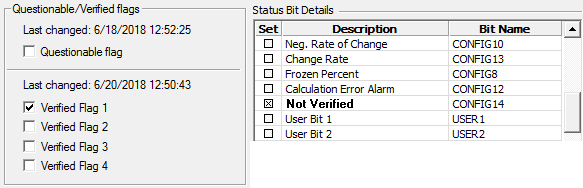
The following image shows a Status Bit Details pane and a section of an Application page of a PNT Editor. The Verified Flag 1 bit is set, but because not all the attributes listed in the CVSMetadata example above are set (Verified Flag 2 is not checked), and the calctype is NOT_ALL_PNT, the Not Verified alarm bit (CONFIG14) will be set.
More:

|
|
|


