Alarms > Customizing the Alarm View > Filtering Alarms

Filtering Alarms

The filter alarms feature is useful when a site has numerous alarms and you want to single out a few for viewing or those that meet a certain criteria. Alarms can be filtered based on a variety of attributes and values.

You can filter alarms using alarm states, real-time service values, point states, point attributes, and facility attributes. These attributes allow you to set criteria so that only those alarms meeting all, not part of, the criteria will be displayed. Rules may be (AND)’ed or (OR)’ed to create a single rule filter, or options are available to combine multiple single rules to (AND) and (OR) rules together to create compound rules.

Alarms can be filtered using CygNet Software's Filter Rules feature. See Using CygNet Filter Rules for more information about using CygNet filter rules.

Example

If you want to see those alarms that are not hidden and have an alarm priority of less than 20, the current alarm filter could be set to the following:

Alarm Filter

In the Contents of pane of the alarm view, a description of the filter appears. If no filter is specified, no description appears.

Contents of

To Filter Alarms in the View

  1. Right-click in the alarm view and select Filter… to view the Alarm Filter dialog box. See Using CygNet Filter Rules for a general discussion about CygNet filter rules and their configuration.

Alarm Filter dialog box

  1. Click Add to create a new filter rule. Or double-click an existing rule to edit.
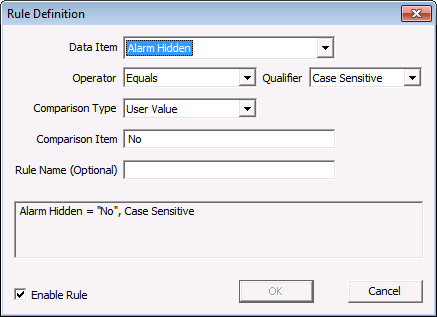
  2. Define the rule as desired by indicating the Alarm Attribute (in the Data Item field), Operator, Qualifier, Comparison Type, and Comparison Item. See Adding Filter Rule Definitions for general information about these fields. The two Comparison Types available in this context include:
  1. Reference Attribute — Any system-defined reference attribute. Select the attribute in the Comparison Item field.
  2. User Value — Any user-defined value that you’d want to compare against. Type the actual value in the Comparison Item field.
  1. Repeat steps 2. and 3. to define a compound rule, if necessary. Define compound rule properties (AND, OR, NOT) by double-clicking on the root rule.
  2. Optionally, give the rule a Name . This is useful to identify template or default rules.

Rule Definition dialog box

  1. Click to enable the selected rule.
  2. Click OK to save the rule definition.
  3. Click OK to add the alarm filter.
Back to top

Let us know how we can improve this topic.

CygNet at weatherford.com

© 2020 Weatherford. All rights reserved.