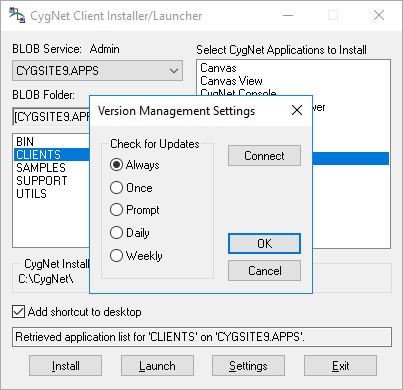
The CygNet Client Installer sets up integrated version management to ensure that you have the latest version of the application files. When you click a CygNet shortcut, the system checks your local files against the master files stored in the BSS. If the BSS files are newer, they will be downloaded to your local drive then the application will be started.
The CygNet Client Installer includes a Settings option that can be used to determine the frequency at which version management is performed. Options are Always, Once, Prompt, Daily, or Weekly. If you are on a LAN/WAN, Always or Daily are recommended. Prompt is a useful option when you are accessing the system remotely (for example, using dial-in access).
When running CygNet Client Installer in standard user mode (limited UI), users can change the version management settings for their user. Administrators can set the default version management settings for the computer by elevating to administrator mode (elevated UI). User version management settings will supersede the default settings for the machine.
The setting remains active until you change it.
The CygNet Client Installer can be used to connect the computer to an ARS on a current CygNet domain. This mirrors functionality available in the CygNet Domain Connection utility, which is described here.
To Connect to an ARS

Note: In the limited UI, users are not permitted to change to a different Domain ID; you must run the CygNet Client Installer as an administrator. See CygNet and User Account Control for more information.

|
|
|

