CygNet Client Installer
CygNet Client Installer
 The CygNet Client Installer displays the names of applications and utilities stored in the CygNet system that can be installed on your computer. You can also use the CygNet Client Installer to launch (start) applications and utilities. The CygNet Client Installer executable is stored in the CygNet\Clients directory (CInstall.exe) on your host server. Or via Start Menu > All Programs > CygNet > CygNet Client Installer.
The CygNet Client Installer sets up integrated version management to ensure that you have the latest version of the application files. Application files are stored in a BLOB Storage Service (BSS). A BSS is a CygNet service that stores files. Typically CygNet applications are stored in an APPS.
Example
In the following example, the BLOB Service is named CYGSITE1.APPS.
Note: You must have at least "Read" access to a BSS to be able to download files from it.
Within a BSS, applications are stored in BLOB folders. The folder names are shown in the BLOB Folder text box. When you select a folder, the applications in that folder are displayed in the Select CygNet Applications to Install text box.
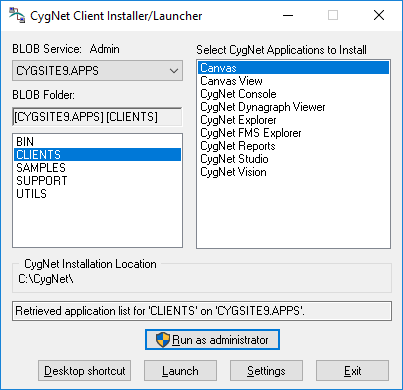
CygNet Client Installer and UAC
Regardless of the type of user account under which you are running (standard or administrator), when you launch the CygNet Client Installer in a UAC-enabled environment, you will be presented with a limited user interface (UI) (shown above). The Install button is not available to standard users.
To perform administrative tasks, such as installing applications or utilities, or changing settings, click Run as administrator, and you will be prompted to change or elevate your security context to that of an administrator user by entering valid credentials for a local administrator account via a UAC consent dialog box. If you are already running under an administrator account you will be prompted to allow the application to make changes to the computer.
Once elevated the CygNet Client Installer interface will display the Install button (known as the elevated UI, shown below).
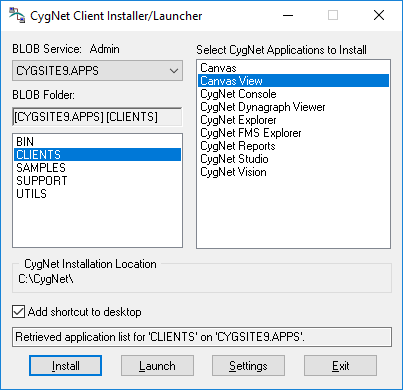
See CygNet and User Account Control for more information about how the CygNet Client Installer functions when UAC is enabled.
To address questions or circumstances beyond the scope of the CygNet Help, Additional CygNet Resources are available.
More:
 Installing and Launching Applications
CygNet Client Installer Settings
Version Management


