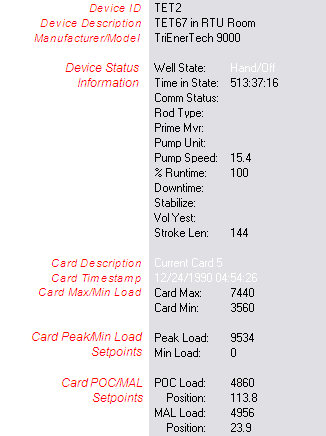
The details panel of the Dynagraph Viewer displays status data for the current device and card. This information cannot be edited.
The color of the text for the Card Description and Card Timestamp fields reflects the card status colors.
In order for the device status information to be displayed, certain Uniform Data Codes (UDCs) must be mapped. See Viewing Cards for more information.
In order for the Details Panel to display available status data details, relevant UDCs must be mapped for the associated remote device. Be sure to first map the UDC for the relevant data group for the correct remote device in the Device Definition Service (DDS), then create points for each required UDC in the Point Service (PNT).
Important: The information in the table below varies based on remote device type and field device configuration. If a data group element in the DDS is unavailable for UDC mapping, data for that element cannot be displayed in the relevant CygNet Dynagraph Control. Also, additional UDCs might apply.
| Detail | Data Group | Data Group Element | UDC | Point Type |
|---|---|---|---|---|
|
% Runtime |
Status Data |
PrtmCur |
WPCPRT00 |
Analog Input |
|
Comm Status |
System Information UDC |
N/A |
SYCSSTAT |
String Input |
|
Downtime |
Program Data |
DowntimeT |
TDDOWNT |
String Input |
|
Prime Mvr |
Well Configuration |
PrimeMover |
WLPMVR00 |
String Input |
|
Pump Unit |
Well Configuration |
PumpUnit |
WLPMPUNT00 |
String Input |
|
Pump Speed |
Status Data |
PumpSpeed |
WPCSPEED00 |
Analog Input |
|
Rod Type |
Well Configuration |
RodType |
WLRODTYP00 |
String Input |
|
Stabilize |
Program Data |
StabilizeT |
TDSTABT |
String Input |
|
Time in State |
Status Data |
StateTimeT |
TDSTATET |
String Input |
|
Vol Yest |
Status Data |
IPYest |
VOY |
Analog Input |
|
Well State |
Status Data |
WStateText |
SWELLT |
String Input |

|
|
|

