CygNet service information details can be accessed from CygNet Explorer or from the CygNet Service Diagnostics utility.
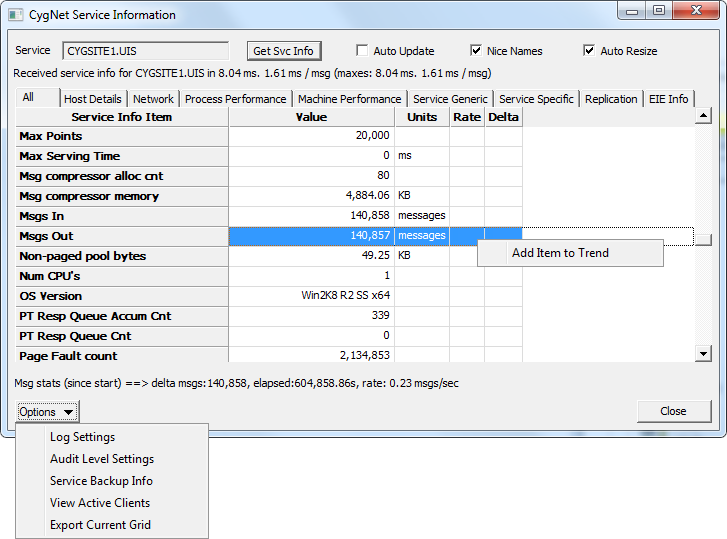
In CygNet Explorer, right-click on a service name in the service hierarchy (left pane) to access the context menu, and then select Service Details to access the CygNet Service Information dialog box (shown below).
Alternatively, you can access the same dialog from the CygNet Service Diagnostics utility. See CygNet Service Diagnostics Utility for more information.
The CygNet Service Information dialog box displays service info item details for a specified CygNet service, and can be viewed as various information sets. For any graphable service info item on the various views, you can also optionally add service info items to a trend to view results graphically. See Info Items for more information and a full list of available info items for each CygNet service type.
The properties on the CygNet Service Information dialog box are described below.
| Property | Description |
|---|---|
|
Service |
Type the service name into the text box, in Site.Service format, to view its service details. |
|
Get Svc Info |
Click Get Svc Info to retrieve and display information for the specified service. |
|
Auto Update |
Click the check box to select/clear automatic updating of service information. When the check box is selected, service information is continuously updated; when it is cleared, service information is updated when you click Get Svc Info. |
|
Nice Name |
Click the check box to select/clear whether to display the "nice name" for each service info item rather than listing its data item string. |
|
Auto Resize |
Click the check box to select/clear automatic resizing of column widths based on their content. |
|
[Service information statistics] |
Describes details about the status of information retrieval for the specified service |
|
[Service information property pages] |
Information results are arranged in sets of related information, available in a series of service information property pages. Click on any column heading to reorder the list based on the selected column's values. |
|
[Service message statistics] |
Describes details about the status of messaging for the specified service |
|
Options |
Click to access a drop-down menu of additional service information options. |
Service information details are presented on multiple property pages, in sets of related information.
Click a tab to view the associated property page, containing one of the following information sets.
Additionally, property pages may include one of the following information sets, where applicable.
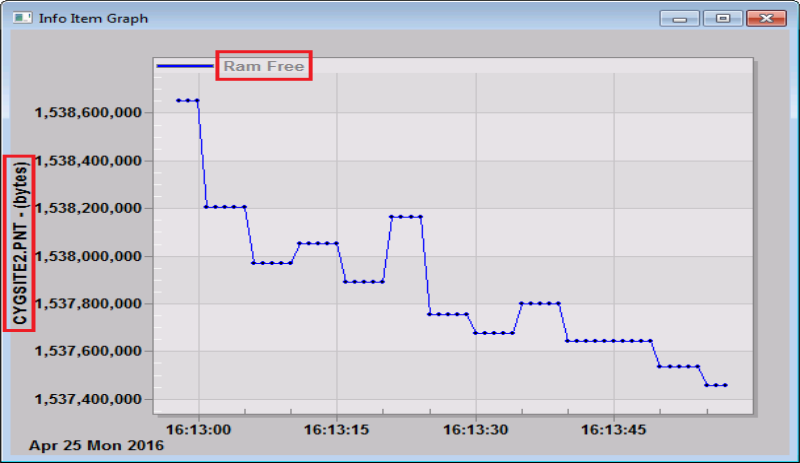
While viewing service information sets, you can optionally select service info items to view as a trend on an info item graph (as long as the selected item is appropriate to graph). See Trending Service Info Items in the Service Monitoring section for more information about using trends.
To View a Service Info Item as a Trend
Click the Options button in the lower left corner of the CygNet Service Information dialog box to access a drop-down menu containing additional service information options. Click one of the options to view additional information about the selected service.
The following scripting options are available for data interface functions related to the CygNet Service Information dialog box.
| COM API | Description and Link |
|---|---|
|
CxDialogs |
The ShowServiceInfoDialog method displays the CygNet Service Information dialog box for the specified site and service pair. See CxDialogs.ShowServiceInfoDialog for more information. |

|
|
|

