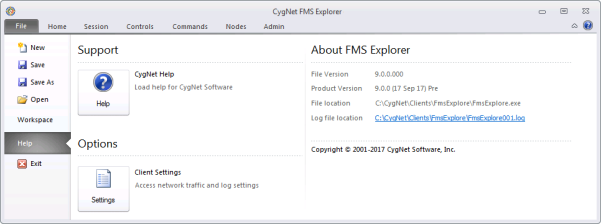
Use the following Help options to access current information related to your FMS Explorer client application.
| Option | Description |
|---|---|
|
Click Help to access the Help. |
|
|
Click Settings to access the Client Settings dialog box. Either view the current settings, or choose to do one of the following.
|
|
|
View About FMS Explorer to see information about your FMS Explorer client application. |
Click the Help button to access the CygNet Help.
Click Settings to access the Client Settings dialog box. Network Traffic information, Application Log Settings, and Network Log Settings information can be viewed, restored to default settings, or edited on this dialog box. See Client Settings for more information.
View the following information about your FMS Explorer client application from the Help page.

|
|
|

