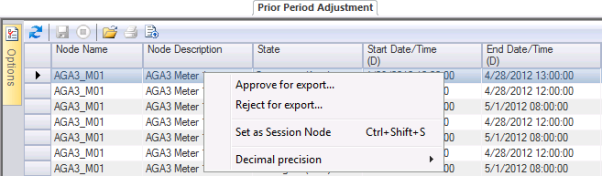
Use the Prior Period Adjustment (PPA) control to approve or reject PPAs from the control data grid.
Once created, PPA records must be approved or rejected for export, and a record of the action will be retained for the audit trail. See Configuring Systems Options for more information about administrative tasks required to configure the manner in which PPAs are handled.
You must have proper security authorization to handle PPAs. See FMS Security (and PPA security event) for information about configuring security access for working with PPAs.
Right-click on a record row in the PPA control grid to access the context menu.
The context menu contains the following options to help you manage PPAs.
| Option | Description |
|---|---|
|
Approve for export |
Click Approve for export to access the Save record dialog box. You will need to select an Audit category from the drop-down menu, and you will have the opportunity to write Comments regarding the record in the text box. Click to Save the Prior Period Adjustment record approval. See Configuring Audit Categories on the Admin menu to add audit categories. For Category type select Handling PPAs. |
|
Reject for export |
Click Reject for export to access the Save record dialog box. You will need to select an Audit category from the drop-down menu, and you will have the opportunity to write Comments regarding the record in the text box. Click to Save the Prior Period Adjustment record rejection. See Configuring Audit Categories on the Admin menu to add audit categories. For Category type select Handling PPAs. |
|
Set as Session Node |
Click Set as Session Node to set the selected Node as the Session Node, to consult additional data. Alternatively, press Ctrl+Shift+S to set the Session Node using a keyboard shortcut. See Session Node and Using Keyboard Shortcuts for more information. |
|
Decimal precision |
Click to select Decimal precision for the display from 0 - 10 decimal places. Default value is 7 |
To Approve or Reject PPAs
Note: See Configuring Audit Categories on the Admin menu to add audit categories. For Category type, select Handling PPAs.

|
|
|

