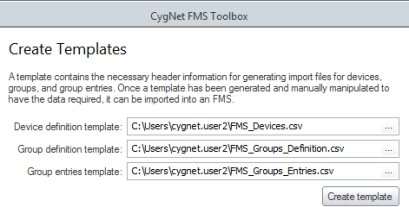
The Create Templates task helps you create import file templates that are used to import files for FMS device and group Nodes, so that you don't need to manually create the column headers for each file. Each template generated contains the specific column header information required for the file type you wish to import (device definition, group definition, or group entries). Once a template is generated, it will be saved to the specified directory location.
Templates can be created for device definition, group definition, and/or group entries import files as follows. You do not need to create all templates at one time. Leaving the text box for any directory path blank will skip creation of that template.
To Create an Import File Template
Once your .csv file templates have been created, the next step of the process is to edit the files to prepare them for the subsequent step, where you will import the files back into FMS.
See Configuring and Editing Device CSV Files for more information.

|
|
|

