The CygNet FMS Balance Control is an ActiveX control used to view measurement data in order to understand the material and energy balances at various Node levels within the system. Each row represents a record time period, which can be expanded or contracted to customize the current view. Each column represents a data field.
See Using the Balance Control for more information about configuring and using this control.
See CxFmsBalanceCtrl Object in the Scripting section for more information about scripting this control.
To Add and Configure a CygNet FMS Balance Control in CygNet Studio
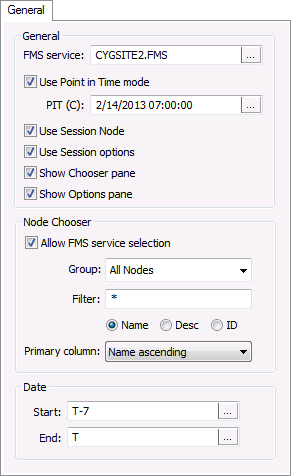
on the Standard Tools palette.The General page of the CygNet FMS Balance Control Properties dialog box contains the following properties. The Balance control displays data in Contract time (C) with one exception, therefore time format selection is not available in this control. The Last Modified timestamp is viewed in Local time (L).
| Property | Description |
|---|---|
| General | |
|
FMS service |
Type the name of the Site.Service to which to connect in the control's Chooser, or click ... to access the Select Service dialog box. |
|
Use Point in Time mode |
Click the check box to select/clear the option to use the Point in Time mode. |
|
PIT (C) |
If Use Point in Time mode is selected, do one of the following.
Default value is T, date and time today. See Using the Home Menu for more information about PIT mode. |
|
Use Session Node |
Click the check box to select/clear the option to Use Session Node instead of using the chooser. Default value is cleared. |
|
Use Session options |
Click the check box to select/clear the option to Use Session options instead of entering a time window and time format. Default value is cleared. |
|
Show Chooser pane |
Click the check box to select/clear the option to display the Chooser pane in the control. Default value is selected. |
|
Show Options pane |
Click the check box to select/clear the option to display the Options pane in the control. Default value is selected. |
| Node Chooser | |
|
Allow FMS service selection |
Click the check box to select/clear the option to show the FMS service selector in the control's Chooser. |
|
Group |
Select the desired Node Group type to display in the control's Chooser from the drop-down menu. Options are as follows.
|
|
Filter |
Select a filter. First type a partial string of known Node name/description/ID characters to populate the filter text box in the control's Chooser. Wildcard values * (multiple character) and ? (single character) are supported. Default value is * (multiple character wildcard) - all. Note: Wildcards can be used only when filtering by Name or Desc, not when filtering by ID. Then select a Node option to filter for results. Options are as follows.
|
|
Primary column |
Select the desired primary sort column in the control's Chooser from the drop-down menu. Options include the following
Default value is Name ascending |
| Date | |
|
Start |
Date selections are in Contract days (C). Enter the starting date (absolute or relative date) in the text box or click ... to access the Select Date dialog box. See Selecting Date and Time for more information. |
|
End |
Date selections are in Contract days (C). Enter the ending date (absolute or relative date) in the text box or click ... to access the Select Date dialog box. See Selecting Date and Time for more information. |
See Using the Balance Control for more information about configuring these properties.
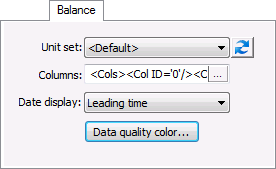
The Balance page of the CygNet FMS Balance Control Properties dialog box contains the following properties.
See Using the Balance Control for more information about configuring these properties.
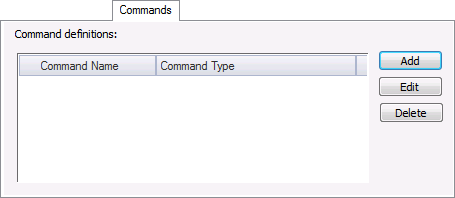
The Commands page of the CygNet FMS Balance Control Properties dialog box contains the following options.
See Managing Node Commands for more information about configuring commands for the FMS Balance control.
More:
CygNet FMS Balance Control – Properties, Methods, and Events