
Familiarity with some fundamental measurement system concepts can enhance your usage of CygNet Measurement.
CygNet Measurement can be run in FULL or REPOSITORY mode. See CygNet Measurement Licensing Requirements and CygNet Measurement Overview for more information.
The following organizational concepts explain how measurement data is organized for efficient viewing and analysis purposes in CygNet Measurement.
The following data concepts explain how measurement data is handled and presented in CygNet Measurement.
Some devices within a system may contain valuable data input yet may not contain volume and/or mass and/or energy values. When records for such devices are received by CygNet Measurement, the missing values are automatically calculated and provided to more accurately account for energy totals within the system.
See Using the History Grid Control for more information.
CygNet Measurement provides balances for a single Node at a time, over a defined time range, to show inflow/outflow balance data values (receipts/deliveries) for volume, energy, and/or mass in your system, using a user-selected unit set. Use the Balance control to view these values. Eligible Nodes include Station Nodes (station meters or station groups) and Gas or Liquid Device Nodes (with support for periodic history). You can review and use the calculation results (Gain/Loss or % Change) and balance information (Volume/Energy/Mass +/- values) presented to produce and publish balance reports (either Balance Contribution, Balance Details or Balance Overview reports) customized to suit your business reporting goals. See Using the Reports Control for more information.
The Node contribution for balancing purposes, whether receipt (+) or delivery (-), is configured at the Station Node (meter or group) or Liquid Device Node level, but for virtual station group Nodes the contribution can be configured separately at the virtual station group level and the station group entry level.
For a Node belonging to a virtual station group, the station contribution value configured within the station group Node properties (Station Group Entries page) is used; otherwise the contribution value configured for the member Node properties is used.
Note: Modifying the contribution value for a Node within the context of the group (station group Node properties) does not change the contribution value configured for the member Node properties.
See Using the Nodes Menu for information about configuring contribution properties at Node creation.
See Viewing and Editing Node Properties for information about editing Node contribution properties.
See Using the Balance Control and Running CygNet Measurement Reports for more information.
Note: This functionality is only available in systems licensed for FULL mode.
CygNet Measurement provides a "close period" process (via the Close Period control and Close Period command) for closing Node records in your system through a defined date. Use the Close Period control to view these records. Eligible Nodes include Station (station meters or station groups), Group (general groups resolve to their member Nodes), or Device Nodes (gas devices, or liquid devices supporting periodic history).
Once a record has met the criteria for closing and has been closed, further edits may generate a Prior Period Adjustment (PPA). Conditions for closing periods and for creating PPAs are configured on the System Options page of the Administrative Options menu. See Configuring System Options for more information.
Closing a period also creates an entry in your system that you can reference later for tracking system history. See Viewing Command Logs for more information.
See Close Period and Using the Close Period Control for more information.
Chromatographs typically have a C6+ or C7+ design, measuring individual hydrocarbons up to C5 or C6 and returning the heavier components as a summed C6+ or C7+ measurement. The heavier components need to be split out into the actual components to ensure accurate calculation. In CygNet Measurement this is called a composition split.
For example, a typical C6+ composition split might be 85% C6 (n-Hexane), 12% C7 (n-Heptane), and 3% C8 (n-Octane).
See Configuring Composition Splits for more information.
Contract hour is a device configuration item that describes an offset in hours from Device time; it is used to define a Contract day and to determine Contract time, which is used in CygNet Measurement.
See Using Contract Hour in CygNet Measurement for more information.
Data Collection Status can be viewed in the FMS Explorer Dashboard control and in the History Grid control.
The Collection Status of a device record is an aggregation of the data states of its status fields, as described below.
The device data being collected has an expected work flow comprised of several data states. All device records start in the "Not requested" state and are then modified as raw data is requested and/or received (e.g. file imports). Each status field reports one of these data states. User edits of the data do not affect the data states.
The data states of the status fields are always used to arrive at the Collection Status value, but in most locations in FMS the Collection Status is viewed as an aggregated value. Data state values for the individual status fields can only be viewed directly by accessing the Record Summary table in the Dashboard control. See View Record Summary for more information.
The following table describes the possible data states for the status fields.
| Data State | Description |
|---|---|
|
Not requested |
No request has been made for data. |
|
Failure |
The data was requested, but the request failed. |
|
Offline |
The device was offline at the time of the request. |
|
Not supported |
The device does not support this type of data. |
|
Unavailable |
The device reported that the data was not available. |
|
Valid |
The data was successfully retrieved. |
|
PTI (Prior to Installation) |
The data requested cannot be retrieved because it is prior to the device installation date. |
|
(Facility not resolved) |
The UDC could not be resolved for the facility. Possible causes include the following.
|
Each device record has four possible status fields defined in the database, which in turn define the collection status of the device record. The following status fields, each of which returns one of the data states listed above, are aggregated to determine the collection status for the data record. Data state values for the individual status fields can be viewed directly in the History Grid control.
| Status Field | Description |
|---|---|
|
Periodic Metering (PM) |
PM Status - Status of the device periodic metering records, if the device supports the periodic collection of metering history. |
|
Periodic Quality (PQ) |
PQ Status - Status of the device periodic quality records, if the device supports the periodic collection of quality history. |
|
Events |
Event Status - Status of the device event records, if the device supports the collection of event data. |
|
Alarms |
Alarm Status - Status of the device alarm records, if the device supports the collection of alarm data. |
Collection Status reflects an aggregation of the device record status fields, and can be displayed in both the Dashboard and History Grid controls.
To view collection status in the Dashboard control, select Collection status as the data view. In the Dashboard data grid, Collection Status is displayed as a single value aggregating all four status fields (PM Status, PQ Status, Event Status, and Alarm Status). See Using the Dashboard Control for more information about the control.
To view collection status in the History Grid control, access the individual Status field columns (PM Status, PQ Status, Event Status, and Alarm Status) in the data grid. In the History Grid, data can be rolled up to one of several record spans, so Collection Status is displayed as an aggregated value for each Status Field. See Using the History Grid Control for more information about the control.
Possible values for collection status are as follows.
| Collection Status | Description |
|---|---|
|
Good |
Every status field is one of the following options.
|
|
Good (U) |
At least one status field is as follows.
Remaining status fields are one of the following options (as for "Good" above).
|
|
Failure |
At least one status is as follows.
|
|
Not requested |
Every status is as follows.
|
|
Offline |
Every status is as follows.
|
|
Prior to Installation |
Every status is as follows.
|
|
[NR] (Facility not resolved) |
Every status is as follows.
|
|
Other |
All cases not matching other status definitions. |
Collection Details reflect additional collection status details for the record, so you can see at a glance which specific types of data are missing for each data grid cell, and the reasons for the missing data. These details can be displayed in the Dashboard control.
To view collection details in the Dashboard control, select Collection details as the data view. See Using the Dashboard Control for more information about the control.
Missing data collection status details are displayed as a letter value indicating the type(s) of missing data. The value displayed is based on an aggregation of available collection status details. When aggregating the collection details value for the cell, uppercase characters supersede lowercase characters, which supersede blank cells. If any of the records for the cell are in the state indicated, that will appear as the collection detail status for the entire cell.
Possible values for collection details are as follows.
| Collection Details | Description | Explanation |
|---|---|---|
|
[blank] |
No missing data |
|
|
[NR] |
Facility not resolved |
|
| [NS]
|
Data not supported |
|
| PTI
|
Prior to Installation |
|
|
a |
Missing Alarms |
|
|
A |
|
|
|
e |
Missing Events |
|
|
E |
|
|
|
m |
Missing Periodic Metering history |
|
|
M |
|
|
|
q |
Missing Periodic Quality history |
|
|
Q |
|
The goal of the CygNet Measurement system is to provide the best possible data for downstream accounting purposes. This is achieved by associating a data quality level with each gas metering and gas quality record that passes through the system. Data quality is the current level of confidence that can be placed in the data record value for purposes of operations, accounting, billing, etc.
A data quality flag is assigned to each data record by the validation engine. The purpose of the flag is to indicate the level of confidence in the validity of the data. A measurement analyst can manually adjust the data record value to a higher quality as records are approved, or decrease the quality if a data record value is deemed incorrect. The ability to edit and save records of various data quality settings is regulated by the user's security authorization level.
The two factors used to determine data quality in CygNet Measurement are Influence and Acceptability.
Influence determines which data records take precedence over other records, and is indicated by a positive numerical value. A higher value number equates to a higher influence. Influence rankings provide a method for out-of-order processing of the data, where the "best" system data will be reflected automatically by its order in the hierarchy, without any further external manual intervention.
Acceptability indicates the level of confidence in each data record, which a business can use to understand the overall level of confidence in all measurement data for any given period of time. Acceptability is measured as a numerical percentage value from 0 to 100.
In summary, the influence determines the hierarchical importance of the data, and the acceptability percentage determines the acceptability or validity of the data. It is possible to have higher precedence data with a lower acceptability percentage, or lower precedence data with a higher acceptability percentage.
Data quality ranking organizes records by determined quality rather than by time. The chronological order of the data (out-of-order processing) is less important than the data quality of one record over another.
Data quality settings are configured from the Admin menu in FMS Explorer, and require proper security access. See Configuring Data Quality Settings for more information.
The following table displays a sample data quality profile, categorized into several possible use cases.
Example
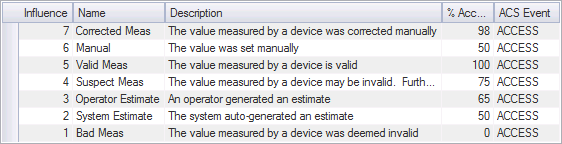
See Configuring Data Quality Settings for more information.
Each data quality level has an associated ACS Security Event that determines who is allowed to edit or save gas device and gas station records of a specific data quality. Based on security settings, a System Administrator can control who is allowed to save records to a specific data quality and who is allowed to edit records at a specific data quality.
You must have proper security authorization to access various types of FMS records. See FMS Security for more information.
See Master Record for more information about how CygNet Measurement determines the “best” or “master” record for any given time span.
Data can arrive in the CygNet Measurement system from a variety of sources, including various configured polling engines or via file imports from other locations or device laptop files, either manually or automatically. Data source is a property of a record for a specific Node. In cases where necessary data values are not provided by the device, they may be calculated by the CygNet Measurement system, resulting in a data source value such as System Calculated.
A data source value is assigned to each data record that passes through the system. The purpose of the value is to indicate the origin of the data that record contains. A measurement analyst cannot adjust the data source value directly, but the value may change as a result of additional data received or changes made to values involved in component calculations. The ability to edit and save records of various data source values is audited by the system.
Data quality ranking organizes records by determined quality, rather than by time received. The chronological order of the data (out-of-order processing) is less important than the data quality of one record over another.
Editable data controls (History Grid, Configuration, Alarm) display data source information for the records you are viewing. Depending on the type of record, possible data source values are as follows.
History Grid control - Data source
Notes:
Once edits to a record produce a Data Source of User Override (edits to Volume, Mass, or Energy values), further recalculations to the record can be accomplished manually, using the Recalculate option in the History Grid control context menu. Alternatively, recalculation of user-eited data can be configured as a system option to occur automatically.
See Editing Data in the History Grid for more information about manual recalculation.
See Configuring System Options for more information about automatic recalculation.
Configuration control - Log source for Configuration view
Configuration control - Data source for Gas analysis view
Alarm control - Source
Measurement data is managed on two levels, the device level and the station level. This differentiates between how data is measured (device level data) and how it is reported (station level data). Data is stored in the system as hourly values, although you can opt to view the data in your client application in various formats.
A station can be a Station Group Node (either physical - which contains gas device(s), or virtual - which contains liquid devices or other stations) or it can be a gas device Node (of the "station meter" type only - which is a gas meter Node that has been configured to also function as a station) or for balancing purposes a Liquid Device Node (supporting periodic history) can function as a station. See Nodes for more information about device and group Nodes.
Only station level data is exported to third-party users such as production accounting.
The following important consideration applies to the rollup of device level data to the station level.
The following important considerations apply to viewing and managing pressure values for device and station level data.
See CygNet Measurement Data Calculation for more information about data aggregation in CygNet Measurement.
Note: Editing functionality is only available in systems licensed for FULL mode.
The edit state of a Node record indicates if the record is open, if it has been closed, if it is a result of a prior period adjustment, or if the record is in a mixed edit state (e.g. a rolled-up record containing multiple edit states). The edit state can optionally be viewed on the Dashboard, History Grid, Configuration, and Alarm controls.
Note: This functionality is only available in systems licensed for FULL mode.
When configured by the system administrator, the CygNet Measurement system will find missing data, late data, and data of insufficient quality; it will then estimate a better value using one or more custom-defined estimation rules. Estimation is only performed at the station level.
See Managing Estimation Engines for more information.
Exception records are stored, one record per exception, in the database. Exception records can be viewed, filtered, sorted, or ignored using the FMS Explorer Exceptions control. Exception handling functionality is available in systems licensed for either FULL or REPOSITORY modes.
Each exception record is "linked" to the record that generated it. Some records may also be linked to other records, e.g. if a configuration record has an exception, all the gas device records that source their configuration from that record might be affected. As a result, an exception record is linked to a range of other records in the database.
The status of each exception record is considered to be "Open" until it has been handled. An exception can be handled in a variety of ways; it can be ignored, or a new data record can be created (either manually or automatically), but the record is never actually cleared. If a new data record supersedes the data record causing the exception, the exception is closed. The new data record will then be validated, and may or may not generate the same or different exceptions. When an exception is ignored, an audit record is attached to the exception record to track why the issue was ignored. If the record is closed, then no audit record is recorded.
Possible exception record statuses are as follows.
| Exception Status | Description |
|---|---|
|
Open |
Exception has not been addressed yet |
|
Ignored |
User chose to ignore the exception |
|
Resolved manually |
User edited the data, which created a new data record |
|
Resolved automatically |
Exception was automatically closed, because new data was received via polling or import, creating a new data record. Exception was automatically closed, because a manual Validate Data command was executed after the data was received. |
Ignoring exceptions has ramifications on data availability, and also influences data quality (history) and data status (gas analysis) values.
See Ignoring Exceptions for information about clearing exceptions.
Each gas device Node is associated with a variety of configuration data item values that have a direct impact on the calculation of its measurement data. These values include data items related to the physical characteristics of the gas and its component values, describing the gas quality, that can come into the system in a variety of ways. Gas quality information can come directly from a live gas quality source, from a gas analysis file based on a laboratory sample, or as polled gas quality configuration values from the device. In addition, a Node can alternatively be configured to source its gas quality information from another Node. The system accommodates gas quality data item values that are supplied by any of these methods. Access to these record types is supported in systems licensed for either FULL or REPOSITORY modes of operation.
The hierarchy of data quality for gas quality records is generally as follows.
Gas analysis records and gas quality records all describe the physical characteristics of the gas, but differ in the quality of the data, how the data enters the system, and how the values are used, as follows.
Gas quality (GQ) data refers to a set of configuration data items containing information about the composition and quality of the gas. It can be "live" data from the device (e.g. a chromatograph device or a gas meter device that supports live GQ), or it can be sourced from elsewhere and sent to the device (and retrieved via a configuration poll). Live GQ data is considered to be of the highest quality, whereas configured GQ is considered to be of lower quality.
Each gas quality record can come into the system as live device data, or from a Gas Quality CSV file import that is sent directly to the device and then brought into CygNet via a Configuration data poll of the device by the CygNet polling engine (processed via the DDS/UIS). Polled gas quality configuration records contain only the data item values available from the device. This set of data items is a subset of the data items that may be available in a gas analysis sample, and the values can be superseded by gas analysis sample values if they become available. Gas quality information can also be updated by sending information to the device from a gas quality configuration record deemed to be of higher quality. See Sending Gas Quality to a Device from the Configuration View for more information.
Gas analysis (GA) data refers to a set of configuration data items containing information about the composition and quality of the gas plus additional analysis information. It comes from outside the measurement system and is based on a laboratory gas analysis sample. Gas analysis records contain gas quality data item values that are generally considered to be of greater quality than configuration GQ, but of lesser quality than live GQ.
Each gas analysis record is imported as a Gas Analysis CSV file import, and the data is stored in the FMS database. The sample analysis often contains more specific and detailed information than is available from a configuration data poll (and contains a super-set of values beyond what can be directly utilized by a specific device). You can optionally configure validation for incoming gas analysis data. Once in the system, you can access gas analysis records for viewing or editing via the FMS Explorer Configuration control, using the Gas analysis data view. Edits to gas analysis records can cause recalculations to associated historical data. Gas quality values (a subset of gas analysis values, that can be utilized by the specified device) can optionally be sent to the device from a specified gas analysis record, and will supersede previous gas quality values, if present. See Sending Gas Quality to a Device from the Gas Analysis Data View for more information.
CygNet Measurement maintains historized system configuration records so that you can view changes made to any configuration record over time. The following types of system records are historized.
See Historizing System Configuration for more information.
If CygNet Measurement has multiple records for the same time span, the service uses special logic to determine the “best” or “master” record for the time span. The master record is the data record that the system believes to be the most accurate for any given time span. Data processing proceeds in order from oldest to newest data, although data processing sequence does not necessarily determine data quality, nor which record is deemed the master record.
Master record status could potentially change for a record period that has previously been closed. If data is edited, or if data comes in from a data source that can result in the creation of PPAs, after the period is closed, depending on the data source and system settings governing PPAs, the master record could be affected. This will not be the case for raw data sources where raw data records already exist. See Prior Period Adjustments for further explanation.
"Is Master Record" status can be displayed as a column in the History Grid control. See Using the History Grid Control for more information.
The logic for determining the master record differs for gas device and gas station records, and is as follows.
Gas device records use the following ordered logic to determine the master record for any given time span.
Gas station records originate from user edits, rollup of gas meter records, or are sent from the SCADA system by external script. Gas station records use the following ordered logic to determine the master record for any given time span.
As data passes through the CygNet Measurement system, it will automatically go through multiple normalization processes to streamline how the data is handled within the system. This process makes the data more informative, so that you can consume and compare values measured in different conditions, and so that your measurement data can be published as quickly and accurately as possible to the widest target audience.
See Normalization Views for information about applying a configured normalization view to device-level or station-level data in CygNet Measurement.
When raw records are converted to device records, the following normalization processing occurs in FMS.
While raw device data cannot be edited, it is always retained in the system to aid in the understanding of normalization, and as part of the complete audit trail. See Using the Raw Data Control for more information.
The default unit set definition can be viewed or set on the Administrative Options dialog box. See Administrative Options for more information.
Data exported out of CygNet Measurement to production accounting is exported at the station level, and can include liquid periodic records. When device level records are rolled up to the station level, the following normalization processing occurs in FMS.
Note: This functionality is only available in systems licensed for FULL mode.
Normalization views are created to allow uniform storage, viewing, or reporting of Node data at the device (periodic history support) or station (periodic history and quality support) level in a common format, even when the data was collected under differing conditions and settings. The data can then be consistently viewed, reported out of the measurement system, or stored in and retrieved from your SCADA system. Multiple normalization views can be created to help manage measurement data.
See Normalization of Data for information about normalization of data within the CygNet Measurement system.
The specified normalization view normalizes the associated Node data into a common user-defined base, using consistent settings which in turn can be used to retrieve, view, and report the data. A normalization view can be configured to write data to a database table and/or to push data to the SCADA system.
Data for different Nodes is not always easily viewed together because it is often based in different settings. Association with a defined normalization view normalizes base settings including the following.
Virtual station group data is rolled up for normalization based on the time setting of the associated normalization view. This applies whether you are normalizing virtual station data to hourly, daily, or monthly values; data will be rolled up accordingly.
In order for virtual station group data to be rolled up successfully, all member Node entries of the group must have the same settings for each of the following.
When storing data in the database, time settings for all data will be rolled up to one of the following time formats, as specified in the normalization view.
When storing data in SCADA, time settings for normalization views are specified by Device time, as an offset from UTC time.
All child station Node data is rolled up from the original Device time zone to the normalization view time zone, in UTC time. Data is always rolled up as it happens, for an instance in time.
See Configuring Normalization Views for more information.
Note: This functionality is only available in systems licensed for FULL mode.
When data is edited (via the History Grid, Configuration, or Alarm controls) or arrives in your system after the period has been closed, a prior period adjustment (PPA) may be created for that record. If the record is already marked as a PPA and then a new record comes in, the new record may either become the new master record or it may be added as a sub-record of the current master record. See Close Period and Master Record for more information about these concepts.
System settings determine when PPAs are generated in your system, and what requirements must be met to close periods. These settings are configured on the Admin menu in FMS Explorer. See Configuring System Options for more information.
If data is edited, or if previously missing data or data with a higher data quality arrives after closing a period, a PPA may or may not be created, depending on system settings and additional factors, including the data source value of the new record. A record of PPA actions is retained by the CygNet Measurement system for auditing purposes.
When data is received for a closed period with one of the following data source values, a PPA may be created (as long as other criteria are met) and it may become the new master record.
When data is received for a closed period with one of the following (raw) data source values, a PPA will not be created (unless the new data is filling in a gap of previously missing data, in which case a PPA could be created), and the new record will instead be added as a sub-record to the current master record.
See Using the Prior Period Adjustment Control for more information about handling PPAs.
Raw unvalidated measurement data collected from electronic flow measurement (EFM) devices in the field, imported, or from a laptop file is known as raw device data and can be viewed on the Raw Data Control. Although edits are not performed directly on the raw device data, the raw data is stored and retained as part of the complete audit trail.
See Raw to Device Normalization above and Using the Raw Data Control for more information.
The CygNet Measurement system validates incoming and/or edited data (if configured to do so) to ensure that measurement analysts get as accurate a representation of volume flowing through their measurement devices as possible. Validation functionality is available in systems licensed for either FULL or REPOSITORY modes.
Since data coming from electronic flow measurement (EFM) devices in the field or from external files or systems may sometimes be of suspect or poor quality, incoming data can be configured to go through an analysis process (a validation engine) where records are validated against one or more validation rules (comprising the engine) to quickly identify problems in the data. Invalid data identified by the validation process generates exceptions to alert both system and users that there may be problems requiring action.
Validation rules belong to various rule categories including configuration, gas analysis, gas quality, or various types of historical data and are assigned to define validation engines in the system. The validation engines can be assigned to a device or group via FMS Explorer, using the Validation button on the Admin menu.
User-edited data of these various data types can also optionally be configured for system validation. See Configuring System Options for more information.
See Managing Validation Engines for more information.
CygNet Measurement (FMS) calculates volume from input values. FMS also calculates a Volume Correction Factor (VCF) value that is a ratio of system-calculated volume to device-provided volume. This value is stored in the gas device record, and is used to maintain consistency in the system, and for volume recalculation purposes to align values when a user makes a data change per API 21.1. It ensures that the system calculations performed by CygNet Measurement yield results equivalent to those provided by the device.
VCF is calculated by dividing the calculated volume by the device volume, so that you can quickly see how far off the calculated value was from the device value. The ideal value of VCF is 1.0 and most calculated values also ideally approximate 1.0. The VCF values for volumes returned from different devices are expected to vary slightly, reflecting the intrinsic variations in calculation logic between various field devices. Observing VCF values can also help you identify potential accuracy issues (device configuration mismatches, out-of-range parameter values, missing events, etc.).
For device data, CygNet Measurement meets API 21.1 requirements by ensuring that all averaging is "flow time linear averaging" and specifically that if there is no flow time during the entire period being averaged, a simple average will be used. The VCF value is a notable exception to this approach however. Since VCF directly relates to volume, it is averaged using a "volume-weighted" technique instead of using flow time. Because this VCF value is not returned by the device, the API 21.1 rules don't apply.
If you edit a volume value manually, resulting in a data source value of User Override, the system will automatically recalculate the VCF value, and the new value will be applied to subsequent calculations.
If you edit a device configuration item value that could affect the VCF, you will be prompted to Select Recalculation Process. You must select Recalculate VCF to calculate a new VCF and update the affected historical records. See Editing Configuration Log Entries for more information.
Volume Correction Factor validation rules (fraction or percentage) can be used to ensure that the volume calculations are correct within a specified tolerance. Records failing validation of this tolerance will generate an exception. See Volume Correction Factor validation rules for more information.
See CygNet Measurement Data Calculation for more information.
More:
|
|
|


