Note: There is no option to cancel the command request. Wait for the command to finish processing before proceeding.
Commands in CygNet Measurement are executed by the FMS service, and a history of command actions is logged by the system.
CygNet Measurement commands can be executed in the following ways.
The FMS service retrieves available data for valid requests. Requests can only be sent for Node(s) which are configured to support the requested data. See Creating Nodes for more information.
See FMS Commands for more information about commands used in CygNet Measurement.
In FMS Explorer, commands can be executed through several locations in the user interface.
See Locations for Executing Commands in FMS Explorer for more information about options for command execution within FMS Explorer.
In CygNet Explorer, commands can be executed through the following services.
The Master Scheduling Service can be used to schedule CygNet Measurement command tasks. See Scheduling FMS Command Tasks in the MSS for more information.
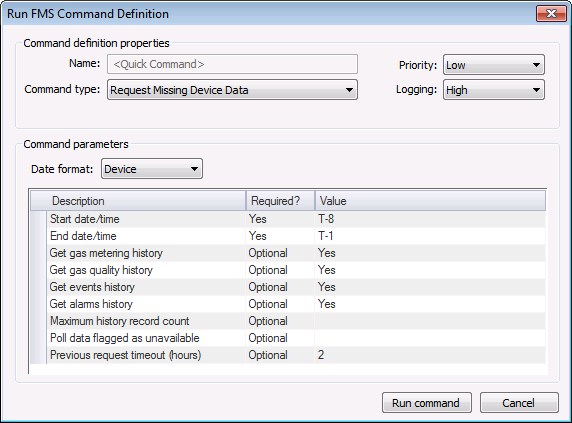
The Flow Measurement Service can be used to run a <Quick Command> against a selected Node, using the following procedure.
To Execute a <Quick Command> from the Flow Measurement Service (FMS)
Note: There is no option to cancel the command request. Wait for the command to finish processing before proceeding.

In CygNet Studio or CygNet Vision, commands can be executed through ActiveX controls placed on user interface screens.
See FMS ActiveX Controls for more information.
In CygNet Software, scripting reference libraries are provided to help you customize your system. Scripting libraries provided for CygNet Measurement include CxFms for FMS automation objects and CxHmiFms for FMS control user-interface objects.
See Scripting for general information about scripting in CygNet Software.
See CxFms for more information about automation objects related to CygNet Measurement.
See CxHmiFms for more information about user interface objects related to CygNet Measurement controls.
|
|
|

