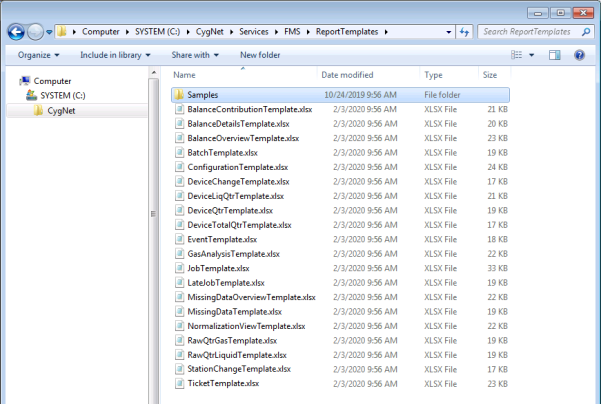
Report template files are .xlsx files that describe how the various reports defined in your system will be formatted and what data each report displays. The FMS service uses a distinct template file to define each report command in the system, so the templates must exist prior to running any FMS reports. CygNet Measurement provides a variety of sample report template files, which users with proper security access to the host server can use to create additional, customized templates.
Note: For the reports feature to function, the CxFmsStandardReport.dll file must be included in the Support folder on the computer hosting the FMS service. See Installing CygNet Measurement for more information.
See FMS Commands for more information about the reports commands supported by CygNet Measurement.
See Managing Report Definitions for information about the report definitions that reference template files.
See Using the Reports Control for information about viewing, saving, printing or emailing reports.
When the FMS service is run, the sample report template files are extracted to the CygNet\Services\FMS\ReportTemplates\Samples folder on your host server. If previous sample templates exist in this folder, they will be overwritten.
When you run a report command, the FMS service looks for the report template file in the location specified in the FMS configuration file (CygNet\Services\FMS\fms.cfg), and uses the file that is present in the specified location to populate the available report command options.
If not specified otherwise, the default report template file location is the CygNet\Services\FMS\ReportTemplates folder on your host server. To change the file location, change the value of the REPORT_TEMPLATES keyword in the configuration file. See FMS Configuration File Keywords for more information about specifying keywords.
To Change the Report Template File Location
The report template files saved to the location specified in the fms.cfg file will determine the report options available in the following locations.
See Managing Report Definitions for more information.
See Using the Reports Control for more information.
See Scheduling FMS Command Tasks in the MSS for more information.
Report template files define and describe both the report command definition parameters and the formatting and content of the information within the specific report. Templates contain a ReportDefinition sheet that uses parameters to describe the command, and a ReportSheet that contains formatting and data tokens used to replace data values in the report at runtime.
Use report templates to customize any report type. To achieve this, there are several parameters and types of tokens that can be used, depending on the type of report you are generating.
Example
A report using header tokens and style tokens, would respectively define the values for the report header and the format for the report body, for the values represented by the tokens. Another report may use header tokens, footer tokens and several sets of subsection tokens. These token sets are specific to the report type, and can be configured in the report sheet of the corresponding report template file.
Header tokens are replaced at runtime with the corresponding values to appear in the report header, and provide a list of basic information identifying the report. The report header can also contain static information such as the report name, a company logo, graphics, or any additional information you would like to appear above the body of the report.
In all reports, additional tokens are used in various subsections of applicable report types to represent the report definition, specific types of text and data within the report body, and determine how that data will be displayed. The report body can thus be customized by cell type to show the data, number format, text characteristics, colors, etc. you want to see in your report.
Copy and edit the CygNet sample report template files to create your own report templates for multiple custom reports. DO NOT modify or rename the sample templates. Instead, copy a desired sample template file to another location (e.g. the ReportTemplates folder), and use it to create and edit as many new report template files of that type as are needed. When the service scans the directory for files, each template file found can generate a distinct reports command.
The following guidelines apply to editing and creating report template files.
To Create a New Report Template File from a Sample Report Template File
Use the following procedure to create report template files for each report type option you want to make available in your system.
Note: If you choose to include these optional parameters in your report template, they will no longer appear for configuration in FMS Explorer or CygNet Explorer.
Each report template contains report worksheets that define the format and content of a specific report type. The ReportDefinition worksheet uses parameters to define the report type, and the ReportSheet worksheet uses a variety of token sets to define the format and content for that report. Tokens appear as [Token] in the tables provided.
The topics listed below contain tables listing the available parameters and token sets applicable for each report type.
More:
 Balance Contribution Report Templates
Balance Details Report Templates
Balance Overview Report Templates
Changed Device Data Report Templates
Changed Station Data Report Templates
Configuration Report Templates
Device Total QTR Report Templates
(Gas) Device QTR Report Templates
Gas Device Raw QTR Report Templates
Liquid Device QTR Report Templates
Liquid Device Raw QTR Report Templates
Missing Data Overview Report Templates
Normalization View Report Templates

|
|
|

