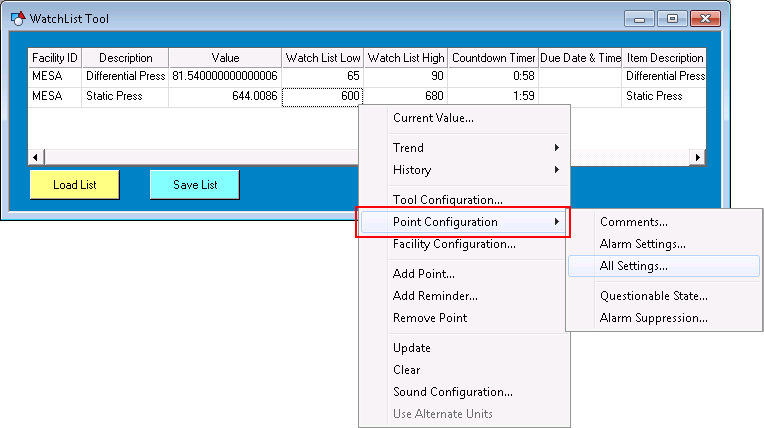
Most CygNet Studio objects provide access to the point properties associated with Alarm Settings for a selected point via the right-click context menu in Run mode. Select Point Configuration > on the context menu to view and/or edit various point configuration record properties for the selected point.
These properties can also be manipulated via script using the COM API exposed through the CxPnt.dll.
Access to and configuration of alarm settings properties in CygNet Studio (and CygNet Vision) is governed by a user's permissions levels.
Each time a user attempts to perform an action that requires a certain security access level for a given application (for example, view a comment or suppress an alarm for a point), access is granted or denied by the ACS based on the built-in security event that governs that property.
These alarm settings properties use either the ACCESS security event or the extended PNT security event(s) specified below, whichever is greater. For example, if a user has an ACCESS level of 3 and COMMENT level of 2, they will be granted a security level of 3.
The following table describes the context menu options and the applicable security events. See the PNT Service security reference for more information.
|
Point Configuration > |
Action | PNT Security Event(s) |
|---|---|---|
|
Comments… |
Opens the Comments page of the PNT Editor where you can view and edit point comments. |
|
|
Alarm Settings… |
Opens the appropriate Analog/Digital/Enumeration/String Alarm Settings page of the PNT editor where you can view and edit alarm setpoints. |
ALARMSET or CFGBITxx (Point record configurable bit (Config Bit 01 - Config Bit 15)) Note: Note the following differences in functionality available via ALARMSET vs. CFGBITxx. If you have ALARMSET level 3 (or greater), then you can retrieve and set all alarm settings including all settings for all Configurable Bits. If you have CFGBITxx level 3 (or greater), but level 0 for ACCESS and ALARMSET, then you may change all CFGBITxx specific settings (Enable/Disable, Calc. Value 1, Calc. Value 2, Alarm Priority, Report to CAS, Report to GNS, Delay Reporting, etc.). |
|
All Settings… |
Opens the General page of the PNT Editor where you can view and edit all point configuration settings. |
ACCESS (+ others as applicable) |
|
Questionable State… |
Opens the Edit Questionable State dialog box where you can view and edit point Questionable/Verified flags. The Questionable/Verified flag is configured on the Application page of the PNT Editor. |
QUESTION |
|
Alarm Suppression… |
Opens the Alarm Suppression Settings dialog box where you can view and suppress point alarms. Alarm Suppression is configured on the Analog/Digital/Enumeration/String page of the PNT Editor. |
Alarm settings properties can also be manipulated via script in a similar manner using the CxPnt.PntClient automation interface. These functions use either the ACCESS security event or the extended PNT Security Event(s) specified below, whichever is greater. For example, if a user has an ACCESS level of 3 and QUESTION level of 2, they will be granted a security level of 3.
The following table describes the related functions and applicable security events. See the PNT Service security reference for more information.
|
Point Configuration Settings |
Related CxPnt Functions | PNT Security Event(s) |
|---|---|---|
|
Comments |
||
|
Alarm Settings |
Note: Note the following differences in functionality available via ALARMSET vs. CFGBITxx. If you have ALARMSET level 3 (or greater), then you can retrieve and set all alarm settings including all settings for all Configurable Bits. If you have CFGBITxx level 3 (or greater), but level 0 for ACCESS and ALARMSET, then you may change all CFGBITxx specific settings (Enable/Disable, Calc. Value 1, Calc. Value 2, Alarm Priority, Report to CAS, Report to GNS, Delay Reporting, etc.). |
|
|
Questionable State |
||
|
Alarm Suppression |

|
|
|

