CygNet Generic Grid Control
 The Generic Grid Control is an ActiveX control used to display data of your choice in grid format in CygNet Studio or Vision screens. It can be used to display any kind of data, not just data from CygNet, although it can only be run on a system with active CygNet services. You can display the results of any ODBC query in a Generic Grid. Other applications might include the display of a list of non-telemetered facilities with user-editable cells for manual data entry, or interaction with a list of configuration files.
The ActiveX control is contained within CxHmiGenericGrid.ocx. This file must be registered on the client running the associated Studio screens or the grid will not function.
Three Generic Grid example screens are available in the APPS SCREXAMP folder:
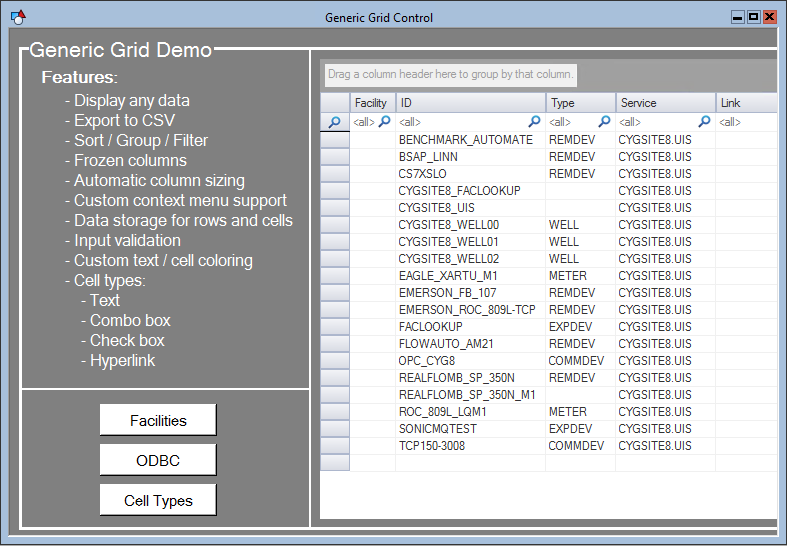
- GENERICGRIDDEMO.CSF — Similar to the generic grid demo shown below.
- GENERICGRIDEXSAMPLESCREEN.CSF — Multiple generic grid examples.
- GENERICGRIDDATAMANIPULATION.CSF — A screen that allows sorting, filtering and grouping of data.
Other examples of the generic grid can be seen in the CygNet Redundancy Dashboard screens.
The following image is an example of the Generic Grid Control.
To Configure the CygNet Generic Grid Control
- Using CygNet Studio in Edit mode, locate the Standard Tools palette, click the ActiveX tool and place on a CygNet Studio screen, select the CygNet Generic Grid Control from the list and click the OK button.
- Right-click the newly added Generic Grid Control to open its Property Sheet, click its Normal page, and choose properties to configure, if desired.
Note: The Generic Grid Control is configured in the Script Editor in CygNet Studio.
- Open the Script Editor and edit the script for the "CxHmiGenericGridCtrl<X>" as desired.
-
Save the screen and switch to Run mode.
More:
 Generic Grid Control - Properties, Events, and Methods


