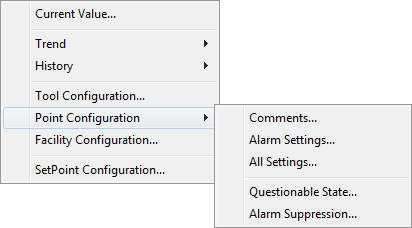
The SetPoint Button Tool has numerous Run mode options. To access available Run mode options, right-click on the button object in Run mode to open its context menu.
Note: You can change configuration settings for this tool in Run mode. However, these settings usually only persist for the current runtime session. When you close the CygNet Studio screen on which the tool resides, the tool settings may revert to those originally configured in Edit mode.
The following table lists and describes the controls available in Run mode for the SetPoint Button Tool.
| Option | Description |
|---|---|
|
Current Value... |
Select to view and/or edit the point's Current Value on the Point Properties dialog box. Note: This option is only available if the Facility and UDC is specified in the button property sheet (not the SetPoint Properties dialog box). |
|
Trend |
Select to trend the point's values on a Default Trend. Options include:
See Tool-Specific Trends for configuration details. Note: This option is only available if the Facility and UDC is specified in the button property sheet (not the SetPoint Properties dialog box). |
|
History |
Select to view and/or edit the target point's History Values or Alarm History. Note: This option is only available if the Facility and UDC is specified in the button property sheet (not the SetPoint Properties dialog box). |
|
Tool Configuration... |
Click to open the CygNet SetPoint Button Configuration dialog box where you can view the configuration settings for the button properties, including runtime-resolved (or unresolved) values of several SetPoint specific properties, if configured:
|
|
Point Configuration |
Select to view or edit various point configuration record properties for the point:
See Configuring Alarm Settings for more information. Note: This option is only available if the Facility and UDC is specified in the button property sheet (not the SetPoint Properties dialog box). |
|
Facility Configuration... |
Select to view and/or edit the point's facility configuration. Note: This option is only available if the Facility and UDC is specified in the button property sheet (not the SetPoint Properties dialog box). |
|
SetPoint Configuration... |
Select to view a read-only (dimmed) view of the original SetPoint Button configuration properties. |

|
|
|


