Setting the Start Screen
There are two methods by which a start screen can be specified. One is through version management; the other is through the Default Workspace option.
Version Management
When CygNet Studio or CygNet Vision are installed, the CygNet Version Manager writes the shortcut target. Always use this shortcut when starting the application to ensure version management is regularly performed.
By default the applications open but no screen is shown. You can modify the shortcut to include command-line parameters to have the application open a specific screen upon startup. This requires modification of the version management Application Definition file (.app) for CygNet Studio/Vision and reinstallation of the application using the CygNet Client Installer.
Note: The Default Workspace setting for a client computer takes precedence over the version management command line.
The default shortcut target created by the CygNet Client Installer for CygNet Studio is shown below:
|
C:\CygNet\Clients\BSSVM.exe MYSITE.APPS CLIENTS -aCStudio.APP
|
Specify a Startup Screen Stored in a BLOB Storage Service
To have CygNet Studio startup with a file stored in a BLOB Storage Service, add the following command-line parameter to the target:
|
\\SITE.SERVICE\FOLDER\File
|
Example
|
C:\CygNet\Clients\BSSVM.exe MYSITE.APPS CLIENTS -rcstudio\cstudio.rsp -pcstudio\cstudio.exe \\MYSITE.BSS\SCREENS\MainMenu.csf
|
Specify a Startup Screen in the Standard File System
To have CygNet Studio startup with a file stored in a Standard File System, add the following command-line parameter to the target:
Example
|
C:\CygNet\Clients\BSSVM.exe MYSITE.APPS CLIENTS -rcstudio\cstudio.rsp -pcstudio\cstudio.exe C:\Screens\Menu.csf
|
Startup Full Screen
The startup screen can be opened in full screen mode. The parameter is /fullscreen.
|
C:\CygNet\Clients\BSSVM.exe MYSITE.APPS CLIENTS -rcstudio\cstudio.rsp -pcstudio\cstudio.exe \\MYSITE.BSS\SCREENS\MainMenu.csf /fullscreen
|
Default Workspace
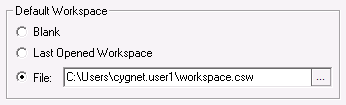
CygNet Studio can be configured to open with a default Workspace. This is set using the Settings option on the Options menu.
Notes:
The Default Workspace is specific to the client computer for which it is defined.
Any Default Workspace setting other than Blank for a client computer takes precedence over the version management command line.
The File option is for a workspace file (.csw), not a CygNet Studio file (.csf).