Note: You can change configuration settings for this tool in Run mode. However, these settings usually only persist for the current runtime session. When you close the CygNet Studio screen on which the tool resides, the tool settings may revert to those originally configured in Edit mode.
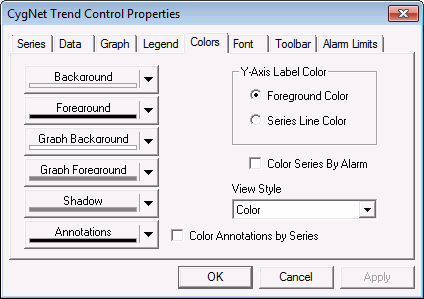
The Colors page options enable you to set many of the color properties for various trend components. See Customizing Point State Colors for more information.
|
|
| Example Trend Tool Colors Page |
The following table lists and describes Colors page properties.
| Property | Description |
|---|---|
|
Background |
This setting specifies the background color of the trend object. It does not affect the background of the graph. See also BackColor and MonoBackColor. |
|
Foreground |
This setting specifies the color of labels on the trend object. This includes the title, subtitle, date range, time, x-axis label, and optionally the y-axis label(s). See also ForeColor and MonoForeColor. |
|
Graph Background |
This setting specifies the background color of the graph. Can be used in conjunction with Background Banding to display a background color in two tones. See also GraphBackColor and MonoGraphBackColor. |
|
Graph Foreground |
This setting specifies the color of the graph grid lines. See also GraphForeColor and MonoGraphForeColor. |
|
Shadow |
This setting specifies the color of the shadow behind the graph, if Shadow is enabled. See also GraphShadowColor and MonoGraphShadowColor. |
|
Annotations |
This setting specifies the color of annotations. Annotations include text displayed when using the Time Slice Values and Series Tag on the Display Information context menu in runtime. See also AnnotationColor, AnnotationColorFromSeries, and MonoAnnotationColor. |
|
Color Annotations by Series |
Check Color Annotations by Series to enable the display of annotations in the same color as the series with which they are associated. This overrides the Annotations setting. See also AnnotationColorFromSeries. |
|
Y-Axis Label Color |
This setting enables you to set the y-axis label color to that of the Foreground Color or the corresponding Series Line Color. If the y-axis contains more than one series, the color of label is that of the first series. See also YAxisLabelColorFromSeries. |
|
Check to enable the series color to reflect its corresponding point state color rather than the defined series color. This setting is applicable only to a single-series trend. See also UseAlarmColor. |
|
|
View Style |
This setting specifies whether the trend is to be color or black and white. If you make color settings, then change this setting to a black-and-white option, the user-defined color settings persist in the trend control properties. See also ViewStyle. |

|
|
|

