Note: Contact CygNet Support to enable this EIE.
Note: Contact CygNet Support to enable this EIE.
The Bsap IP EIE communication device works in conjunction with the BSAP EIE to communicate with BSAP field devices that are configured to use the BSAP IP protocol.
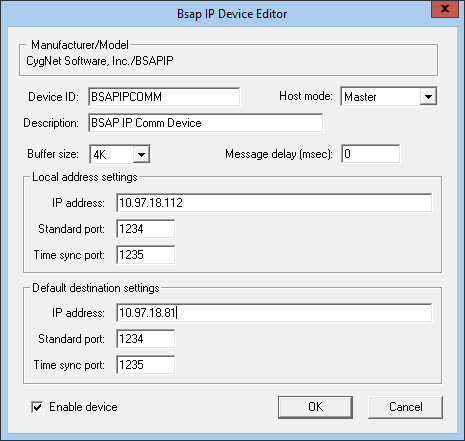
Click the following image to see an example Device Editor:
For information about overriding communication device settings from the remote device, see Overriding Communication Settings.
A 64-bit version of this EIE is available. See 64-bit Device Drivers.
The following tables list and describe properties from the Bsap IP Device Editor dialog box.
| Property | Description |
|---|---|
|
Device ID |
The unique identifier of an instance for this device. This free-form name must be unique in the DDS and the FAC. That is, it must be a name not used by any other communication device, import/export device, remote device, or facility. Valid characters are A-Z, 0-9, dash (-), underscore (_), and tilde (~). No spaces are allowed. 20 character maximum. Note: Tilde (~) is a valid character for both devices and facilities, but its use is not recommended. |
|
Host mode |
Master: This default mode allows any message to be sent. NonMaster: This mode is remote device EIE-specific. It is not designed to allow write messages to be sent to an RTU. However, because each remote device EIE specifies what a write message is, you might still be able to send some write messages. |
|
Description |
A free-form description of the device. 32 character maximum. |
|
Buffer size |
The size (4K, 8K, 16K, or 32K) of your temporary message storage. 4K is ample to handle standard messages. |
|
Message delay (msec) |
The delay (in milliseconds) to wait before sending a message to the remote device. If the remote device also has a message delay, the greater value takes precedence. |
| Local address settings | |
|
IP address |
The address of the local (host) communication device. Required for correct addressing. |
|
Standard port |
The port number of the local (host) communication device. |
|
Time sync port |
The port number used for time synchronization. |
| Default destination settings | |
|
IP address |
The address of a field communication device. Not required for correct addressing. |
|
Standard port |
The port number for a field device on a field communication device. |
|
Time sync port |
The port number used for time synchronization. |
|
Enable Device |
Check to enable or disable the device. The default setting is disabled. The device will automatically disable if an invalid configuration is detected. The device can be re-enabled after the invalid configuration is fixed. |

|
|
|

