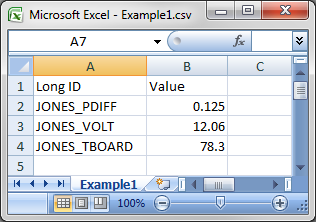
The source file below contains values for three tags. Each row contains data for just one tag.
The column mapping would be:

In the source file below, each row represents a facility and contains data for three items (Differential Pressure, Temperature, Yesterday MCF). Since there are 3 rows (facilities), importing the data for each item for each facility would result in the creation/update of nine tags.
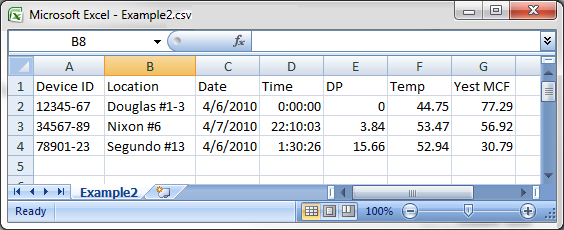
The column mapping would be:
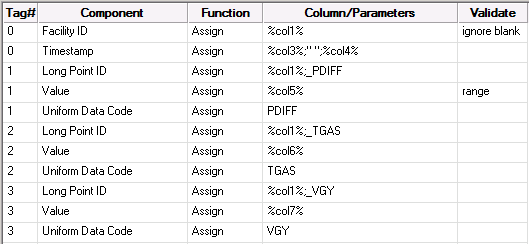
The UDCs used to represent the data items are: PDIFF (Differential Pressure), TGAS (Gas Temperature), and VGY (Volume Gas Yesterday).
Because the source file contains data for three tags on a single row, this mapping contains components for three tags (specified in the Tag # column as 1, 2, and 3). Tag # 0 indicates that the component is shared across all tags: for example, the Facility ID for all tags is found in column 1.
The Long Point ID specifies the tag to which the data belongs. The Long Point ID is identified using a formula that concatenates the facility ID (contained in column 1) with an underscore and Uniform Data Code (added as text).
The date and time are in columns 3 and 4; because the same timestamp applies to all tags on the row, the Tag # column is set to 0. The formula for the "Timestamp" component contains a space between the columns because CygNet timestamps are MM/DD/YY hh:mm:ss. If the space weren't included in the formula, the timestamp would not be valid.
The values for the three tags are contained in columns 5 (differential pressure), 6 (gas temperature), and 7 (volume gas yesterday).
The resulting data in the UIS would be:
|
12345-67_PDIFF |
4/6/2010 0:00:00 |
0 |
|
12345-67_TGAS |
4/6/2010 0:00:00 |
44.75 |
|
12345-67_VGY |
4/6/2010 0:00:00 |
77.29 |
|
34567-89_PDIFF |
4/7/2010 22:10:03 |
3.84 |
|
34567-89_TGAS |
4/7/2010 22:10:03 |
53.47 |
|
34567-89_VGY |
4/7/2010 22:10:03 |
56.92 |
|
78901-23_PDIFF |
4/6/2010 1:30:26 |
15.66 |
|
78901-23_TGAS |
4/6/2010 1:30:26 |
52.94 |
|
78901-23_VGY |
4/6/2010 1:30:26 |
30.79 |
In the source file below, cell 4:D is blank. The table below illustrates how the import results will be affected by using different Processing Blank or Empty Columns choices. See Processing Blank or Empty Columns for an explanation of the settings.
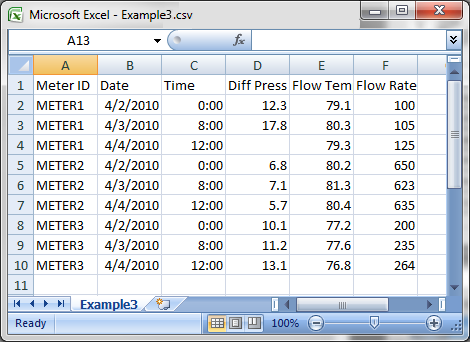
The column mapping would be:
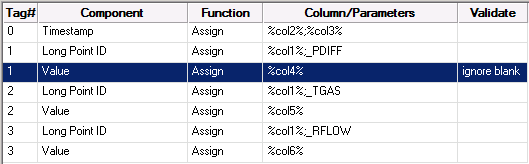
The resulting data in the UIS for the three settings would be:
| Blank or Empty Column Choice | Outcome |
|---|---|
|
Include blank value |
Any existing current value for METER1_PDIFF would be overwritten with a blank and the timestamp would be updated according to the source file. |
|
Reject entry for this component |
Any existing current value for METER1_PDIFF would not be overwritten. The timestamp would be updated according to the source file. Note: In the example above, the existing current value for METER1_PDIFF would be not be overwritten. |
|
Reject all entries for this Tag # |
The entire tag would be rejected. No value would be updated or overwritten, including the timestamp. |

|
|
|

