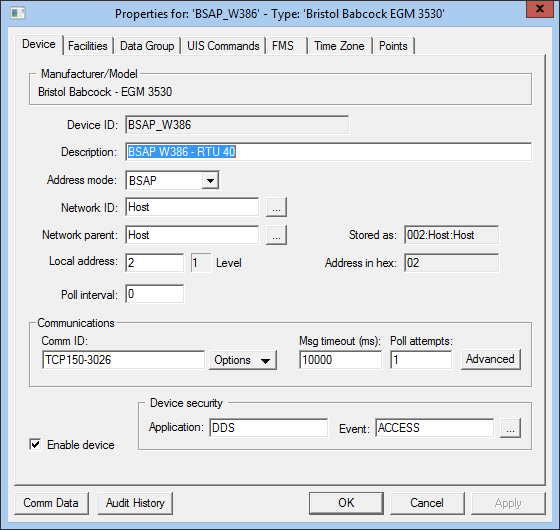
Use the Device page to view, select, and modify general device settings for a remote device. These settings are the minimum required for remote device functionality. The Device page of a remote device editor typically contains settings unique to its field device type(s) or to the EIE itself.
Click the following image to see an example Device page:
For more information, see Remote Device Editors.
The following table lists and describes specialized Device page properties for this device. See Device Page for common properties.
Note: Properties related to the network routing table are displayed in the "RTU Config" data group editor.
| Property | Description |
|---|---|
|
Device ID |
The unique identifier of an instance for this device. This free-form name must be unique in the DDS and the FAC. That is, it must be a name not used by any other communication device, import/export device, remote device, or facility. Valid characters are A-Z, 0-9, dash (-), underscore (_), and tilde (~). No spaces are allowed. 20 character maximum. Note: Tilde (~) is a valid character for both devices and facilities, but its use is not recommended. |
|
Description |
Displays a user-defined description of the remote device. A free-form description of the device. 32 character maximum. |
|
Address mode |
Address mode used in messaging. Can be BSAP or EBSAP (Extended BSAP). |
|
Network ID |
The name of the network. Network Levels in the RTU Config data group must be the same for all devices that use the same Network ID. See Network Routing Table and Levels. |
|
Network parent |
The name of the parent device on the network. |
|
Stored as |
|
|
Local address |
Numeric address of the device. |
|
Address in hex |
The hex equivalent of the address. Displays the user-specified decimal RTU address as a hexadecimal value, which is the format in which the value is communicated to the field device. |
|
Poll interval |
The time (in seconds) in which the BSAP driver will intersperse messages to the device processing the request to ensure that the data is not discarded. This interval may be useful in a busy hierarchical network. If set to 0, no additional messages are sent, only those dictated by protocol and data. |
|
Communications |
|
|
Comm ID |
The name of the communication device this remote device uses. Click the Options button to select from the choices in the drop-down menu. See Communication Devices. |
|
Options |
This button provides several communications-oriented options. Options are as follows:
|
|
Msg timeout (ms) |
Displays the time in milliseconds a remote device waits for a valid response from an associated field device before timing out. This setting is not the same as similar settings on the currently active communication device and device failover settings. But these settings work in conjunction with one another. |
|
Poll attempts |
The number of times a remote device attempts to poll an associated field device until a valid response is received within the message timeout limit. If a poll is successful, no more poll attempts are made. If a poll is unsuccessful, the remote device continues to attempt polls until a valid response is received or until the Poll attempts setting is reached, whichever comes first. |
|
Advanced |
Click to access advanced communication device failover settings. |
|
Enable device |
Check to enable or disable the device. The default setting is disabled. The device will automatically disable if an invalid configuration is detected. The device can be re-enabled after the invalid configuration is fixed. |
|
Device security |
|
|
Application |
Defines the ACS security application name used to validate the users of this device. See Applications, Events, Permissions. |
|
Event |
Defines the ACS security event used to validate users of this device. Click … to select the security event. See Applications, Events, Permissions. |
|
Comm Data |
Enables you to open a modeless Communications Data Viewer dialog box. |
|
Audit History |
Enables you to view the audit trail for the device. |

|
|
|

