In CygNet, a remote device includes two sets of ordinals: the data group ordinal and the facility ordinal.
Each CygNet data group added to a remote device is identified by a number called an ordinal. The ordinal is specified on the Data Group Properties page of the remote device editor. If a remote device requires multiple instances of a data group, the group is defined only once in the template, but multiple instances of the data group, each with a unique ordinal, can be added in the device in the DDS.
Additional facilities that are associated with the original remote device facility must be created in or chosen from the Facility Service (FAC). Although CygNet automatically configures ordinal numbers in the sequence in which you add new facilities to a remote device, you can change the ordinal number to suit your requirements.
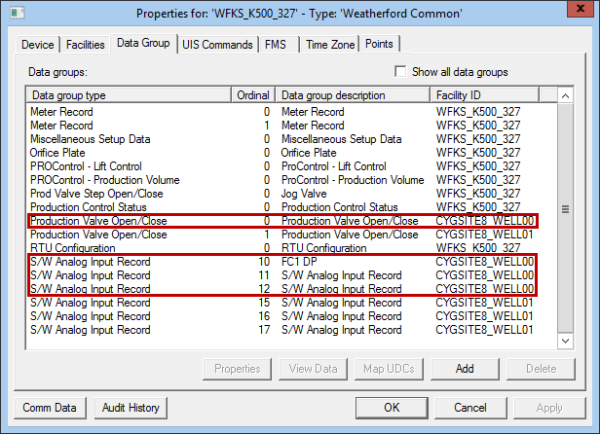
When you add a data group to a remote device, you must identify the facility with which the data group is associated. While data groups must reference the facility that the instance of the data group is associated with, the data group ordinal does not have a direct relationship with the facility ordinal. It is the Facility ID associated with the data group that defines the relationship. In the example below, there are several different data group ordinals that are associated with the facility CYGSITE8_WELL00. The first "Production Valve Open/Close" data group happens to have an ordinal of 0 (the first number assigned in this case) but the "S/W Analog Input Record" data group has several ordinals for its instances.
Because the data group ordinal does not have a direct relationship with the facility ordinal, it is important that you associate the correct facility ID with the data group.
When you add a data group, the DDS assigns the next sequential number to the data group ordinal. If the first time you add a data group, the ordinal is 1, then the next addition of that data group will be ordinal 2. If you delete the data group with ordinal 2 and add another, the next data group will be ordinal 3, since ordinal 2 was already used. Although the data group default may begin with ordinal 1, it can be changed before you commit the data group. Once the data group is saved, you cannot change the ordinal.
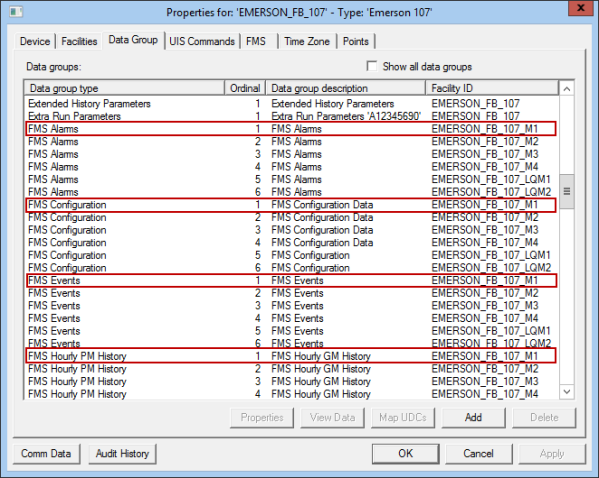
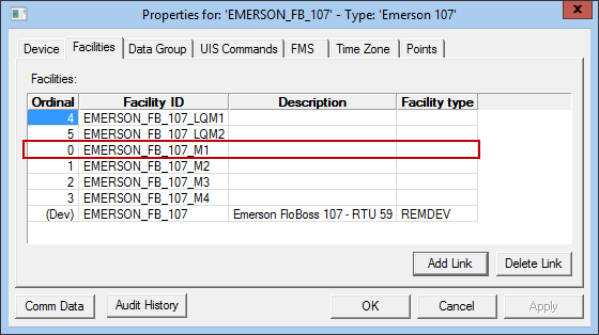
When you have data groups that are "sets," then the ordinal of each data group in the set should be the same, as should the facility assigned to the group. Examples of sets are the various FMS data groups ("FMS Configuration", "FMS Events", etc.). In the example below, the FMS data groups that have the same data group ordinal (1) are considered a "set." In this case, the facility ordinal for EMERSON_FB_107_M1 is 0. It is the Facility ID, not the facility ordinal, that links the facility to the data groups. The key is that you assign the correct Facility ID to the data group. When adding data groups, the ID of the facility is important, not the ordinal of the facility.
When copying a device, the facility ordinal has a relationship to the data group, but the relationship is purely for name resolution. When you copy, the new device will have new linked facility IDs. As such, the only way to show the relationship between the new name and the old name is the facility ordinal. For more information, see Copying a Remote Device and DDS Data Group Copy Utility.

|
|
|

