The relationship between Emerson ROCPlus field devices and CygNet history data groups is defined by the use of RAM areas, segments, points, and ordinals. To some extent, this is also true of FMS data groups because they depend on native history data groups for their data.
Because the process of configuring a CygNet data group to "talk" to a field device begins at the field device, the following information first provides details about field device history points, then native history data groups, and finally EFM data groups.
For more information, see the following subsections below:
In order for your Emerson ROCPlus EIE to collect historical information for a given field device, that device must be properly configured. See the appropriate manufacturer-provided documentation.
For Emerson ROCPlus devices, a combination of history segments and points define where and how data is stored on and recovered from a field device. Segments define the rate of collection and the number of indexed records available. Points simply contain values.
The following list breaks down RAM areas, segments, and points by model and series number:
Note: The following section relates to the native history data groups "Periodic History," "Periodic Daily History," "History — Daily," "History — Daily/Periodic for Day," and "History — Sixty Minute Point."
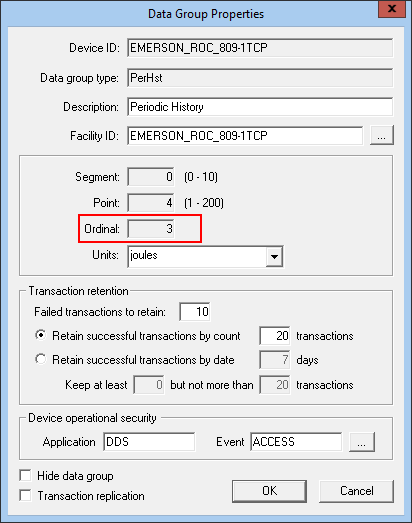
Each CygNet data group added to a remote device is identified by a number called an ordinal. The ordinal is specified on the Data Group Properties page.
For native history data groups, the ordinal derives from an associated history point on a field device. However, history point numbers alone are not always enough to locate and access a point's data. So CygNet history ordinals sometimes derive from a combination of values, as with Emerson ROCPlus devices. Emerson ROCPlus devices combine a segment number with a point number in order to create an ordinal.
Note: Field device units must match the supported units of the history points they map to.
For Emerson ROCPlus devices, a combination of history segments and points define where and how data is stored on and recovered from a field device. Segments define the rate of collection and the number of indexed records available. Points simply contain values.
The following list breaks down RAM areas, segments, and points by model:
To Find History Segments and Points
For an Emerson ROCPlus EIE, find a segment by polling the correct Station # on a "Station Parameters" data group; the segment appears in the History Segment field.
Find points by polling the correct Segment # on a "History Point Configuration" data group; the points appear in the Pt# column.

FMS history data groups also use ordinals. However, these ordinals are associated with a meter, not a history point. When you specify a Meter# in an FMS history Data Group Properties dialog box, that number displays in the Ordinal column under the Data Group page.
Note: Field device history point units must match the supported FMS history data group units.
To Add Segment and Point Numbers
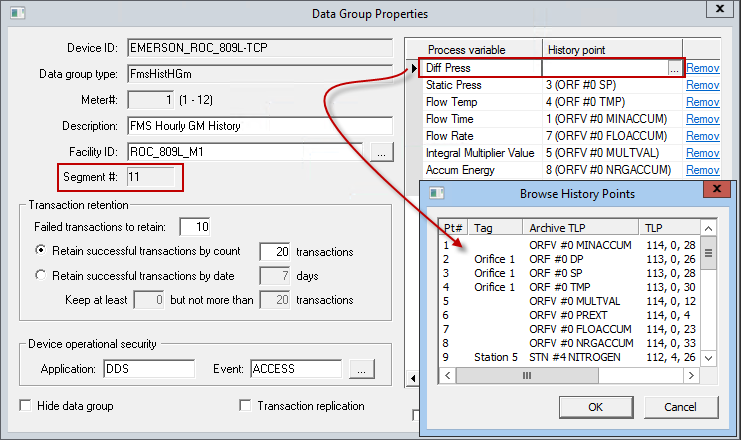
For Emerson ROCPlus devices, the "FMS History" data groups must be configured automatically with Segment # and manually with History Point numbers. After a Segment # is assigned to an FMS history data group, specify the history points needed to map process variables between CygNet and a connected field device. The History Point value is a point number within a segment.
Example
For an Emerson ROCPlus remote device, imagine differential pressure is collected on a field device in segment 11, point 2. A "Periodic History" data group is created to retrieve this data. Specifying segment 11, point 2 in the Data Group Properties dialog box automatically generates an ordinal of 414, which is computed by the CygNet Explorer remote device editor. To collect differential pressure as part of meter 1 FMS history data, the differential pressure process variable for FMS history data group ordinal (meter) 1 must specify the history point as 2.
The following procedure explains how to find and add segment and point numbers to an Emerson ROCPlus remote device that uses FMS.
Note: Poll the "ROC Config" then "History Segment Config Summary" data groups before starting this procedure.
|
|
|

