A "Configurable Data Group" (CfgDg) provides a flexible way to create custom data groups on a per-device basis by using the remote device editor. You can use such data groups in one-off scenarios like testing or, if the data group definition is more broadly useful, paste its XML into the applicable device template file. You may add and configure up to 999 of these data groups per remote device.
Best practice recommends first writing a thorough device template file to accommodate as many of your field devices as possible. Then use a remote device editor to add one or more "Configurable Data Group(s)" on an ad hoc basis to suit unique situations.
See the following subsections for more information:
You might find the CygNet DDS Data Group Copy Utility useful for copying a unique "Configurable Data Group" to other remote devices. You might find the Device Copy utility useful for copying remote devices that use the "Configurable Data Group(s)."
To Define a Configurable Data Group
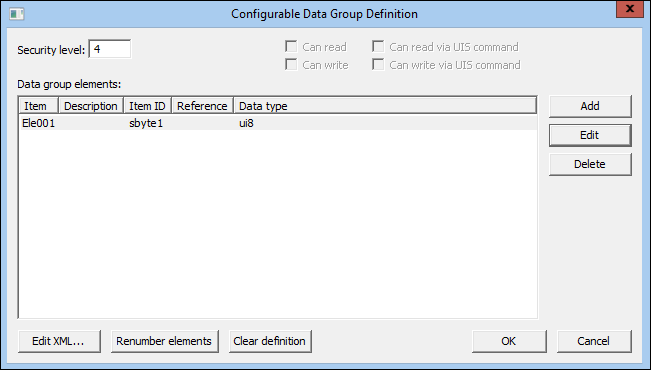
The following table lists and describes the properties of the Configurable Data Group Definition dialog box.
| Item | Description |
|---|---|
|
Security level |
See secLev. |
|
Can read |
This option is not available for the IoT Sparkplug EIE. |
|
Can read via UIS command |
This option is not available for the IoT Sparkplug EIE. |
|
Can write |
This option is not available for the IoT Sparkplug EIE. |
|
Can write via UIS command |
This option is not available for the IoT Sparkplug EIE. |
| Data group elements | |
|
Item |
The name of an element. This can be modified in the XML file. See DataGroupElement. |
|
Description |
See desc. |
|
Item ID |
The name of the item in the payload file. |
|
Reference |
See ref. |
|
Data type |
See type. |
|
Add |
Click Add to add a new element. If another element is currently highlighted, the added element is a copy of the highlighted element. See DataGroupElement. |
|
Edit |
Click to edit the selected element. |
|
Delete |
Click to delete a selected element. |
|
Edit XML |
Click to open your "Configurable Data Group Definition" in an XML editor. Make changes if required. This is useful for fine-tuning your configurable data group definition or for copying and pasting the data group definition into a device template file. |
|
Renumber elements |
Click to reset the numbering of your elements to a simple consecutive format. This is useful if you've deleted elements and want the data group elements to be more tightly ordered. Clicking Renumber elements overwrites data group element IDs whose names you have changed in the configurable data group's XML definition. |
|
Clear definition |
Click to clear the entire data group definition. |
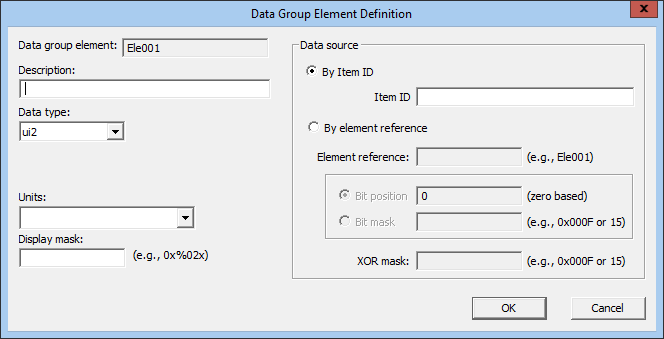
The following table lists and describes the properties of the Data Group Element Definition dialog box.
| Item | Description |
|---|---|
|
Data group element |
Displays the selected data group element. |
|
Description |
See desc. |
|
Data type |
See type. |
|
Units |
See units. |
|
Display mask |
See dMask. |
| Data source | |
|
By Item ID |
Selecting this option enables editing of the Item ID field. |
|
By element reference |
See ref. Selecting this option enables editing of the Element reference field. |
|
Bit position |
See bPos. |
|
Bit mask |
See bMask. |
|
XOR mask |
See bXorMask. |

|
|
|

