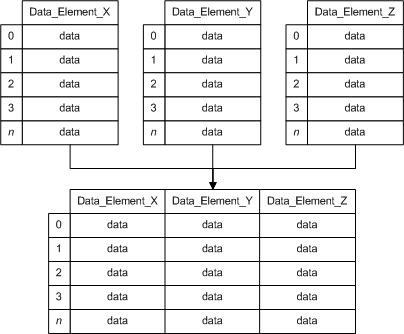
An array data group enables you to display array data elements in a table. A single data group can include a combination of array and non-array data. An array data group is always read only.
There are different ways to handle an OPC array. An OPC server can return an array of data for a single item id. Once returned, it can be displayed as an OPC Array, or it can be interpreted as either a single record or an array of records. If the array of records does not have a timestamp, it is considered a Non-Historical Array and does not receive point processing. If the array of records has a timestamp, it is referred to as an Historical Array and point processing can be performed.
Click the following image to see an array diagram:
See the following subsections for more information:
For more information, see Device Template Files.
 Click here to see an example of the data group Click here to see an example of the data group
<Arrays niceName="Arrays" hasArray="true"> <dgElements secLev="4" type="vrnt"> <N001 desc="RND array r8" itemId="Random.ArrayOfReal8" isArray="true"/> <N002 desc="RND array str" itemId="Random.ArrayOfString" isArray="true"/> <N003 desc="RND r8" itemId="Random.Real8"/> <N004 desc="RND str" itemId="Random.String"/> </dgElements> </Arrays> |
Structure and Components – OPC Array
Example – Record from OPC Array
|
Click here to see an example of the data group
<Record niceName="Record from array"> <dgElements secLev="4" type="vrnt"> <RawArray desc="Raw data" itemId="Random.ArrayOfReal8" isArray="true" hidden="true"/> <E0 desc="Record element 0" sourceDeid="RawArray" index="0"/> <E1 desc="Record element 1" sourceDeid="RawArray" index="1"/> <E2 desc="Record element 2" sourceDeid="RawArray" index="2"/> </dgElements> </Record> |
Structure and Components – Record from OPC Array
|
Click here to see the structure and components of the data group
<DataGroup hasArray="true"> <dgElements> <DEID isArray="true"/> <DEID2 sourceDeid="<DEID>" index=""/> </dgElements> </DataGroup> |
Example –Non-Historical Array of Records
|
Click here to see an example of the data group
<RunTimes niceName="Event Directory" forceSave="true" hasArray="true" maxCnt="3"> <dgElements secLev="4" isArray="true"> <RawData desc="Raw data" type="ui2" itemId="RunTimeArray" recordItems="2" hidden="true"/> <IdNum desc="ID" type="ui2" sourceDeid="RawData" index="0"/> <RunTime desc="RunTime" type="ui2" sourceDeid="RawData" index="1" units="sec"/> </dgElements> </RunTimes> |
Structure and Components – Non-Historical Array of Records
|
Click here to see the structure and components of the data group
<DataGroup hasArray="true"> <dgElements isArray="true"> <DEID recordItems=""/> <DEID2 sourceDeid="<DEID>" index=""/> </dgElements> </DataGroup> |
Example –Historical Array of Records
|
Click here to see an example of the data group
<EvtDir niceName="Event Directory" forceSave="true" hasHistory="true" maxCnt="3"> <dgElements secLev="4" isArray="true" type="ui4"> <RawData desc="Raw data" itemId="Dynagraph.EventDirectory_P" recordItems="5" hidden="true"/> <IdNum desc="Event ID" sourceDeid="RawData" index="0"/> <Reason desc="Code" dMask="0x%04X" sourceDeid="RawData" index="1"/> <DateTime desc="Timestamp" type="r8" sourceDeid="RawData" index="2" cvtF="TimeSeconds" sourceType="ui4" baseTime="1/1/2000"/> </dgElements> </EvtDir> |
Structure and Components – Historical Array of Records
|
Click here to see the structure and components of the data group
<DataGroup hasHistory="true"> <dgElements isArray="true"> <DEID recordItems=""/> <DEID2 sourceDeid="<DEID>" index=""/> <DateTime desc="Timestamp" type="" sourceDeid="<DEID>" index="" /> </dgElements> </DataGroup> |

|
|
|

