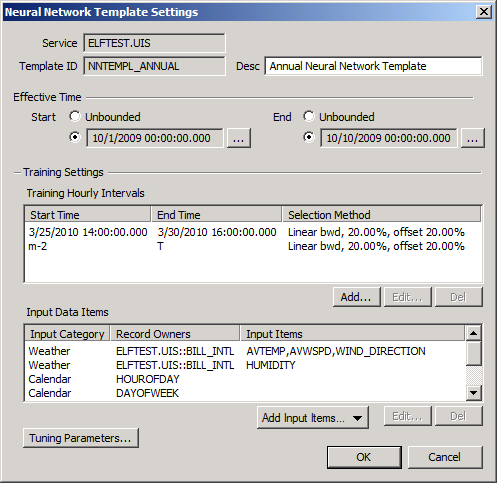
Use the Neural Network Template Settings dialog box to configure the settings for the selected neural network template.
To Configure Neural Network Template Settings
The properties on the Neural Network Template Settings dialog box are described below.
| Parameter | Description |
|---|---|
|
Service |
Specifies the CVS service where the neural network template facilities are maintained. |
|
Template ID |
Specifies the unique Facility ID of the neural network template. |
|
Desc |
Specifies a Description associated with neural network template. |
Specify the time interval for which this neural network template is applicable.
| Parameter | Description |
|---|---|
|
Start |
Select Unbounded or select a specific start time. Click … to set a Start Hour for the effective time for the neural network template from the Choose Date and Time dialog box. |
|
End |
Select Unbounded or select a specific end time. Click … to set an End Hour for the effective time for the neural network template from the Choose Date and Time dialog box. |
The table lists the historic training intervals in the past over which all historical data, gas load as well as input data, must exist in order to execute the training process for this neural network template. Training intervals may be specified as a fixed interval or for a time interval that is relative to the current time. Also configurable is the selection method for the historical data used for training.
| Column or Button Name | Description |
|---|---|
|
Start Time |
Specifies the start time of the training hourly interval. |
|
End Time |
Specifies the end time of the training hourly interval. |
|
Selection Method |
Specifies the quantity and selection method for choosing the subset of historical data used for training. See Configuring Training Interval Settings. |
|
Add |
Click to add a new training hourly interval. See Configuring Training Interval Settings. |
|
Edit |
Click to edit an existing training hourly interval. See Configuring Training Interval Settings. |
|
Del |
Click to delete an existing training hourly interval. |
The table lists the input data items required to both train the neural network and generate load forecasts (once the template is associated with a specific meter or meter group and becomes a definition) for this neural network template.
| Column or Button Name | Description |
|---|---|
|
Input Category |
Specifies the Input Item Categories to be used as inputs to this neural network. Options include: Input Category Item, Calendar, and Gas Load. |
|
Record Owners |
Specifies the Record Owner or Record Owners Group IDs whose data items will be used as inputs to this neural network. |
|
Input Items |
Specifies the Input Data Item type(s) associated with each Input Data Item to be used as inputs to this neural network. |
|
Add Input Items |
To add an Input Item click Add Input Item and select the desired Input Data Item: Input Data Item, Calendar Item or Gas Load Item. See Configuring Input Data Items. |
|
Edit |
Select an Input Data Item and click Edit to modify its properties. See Configuring Input Data Items. |
|
Del |
Click Del to delete an Input Data Item. |
Click Tuning Parameters to specify necessary tuning parameters required by the neural network training algorithm for this neural network template. See Configuring Tuning Parameters.
More:
 Configuring Training Interval Settings

|
|
|

