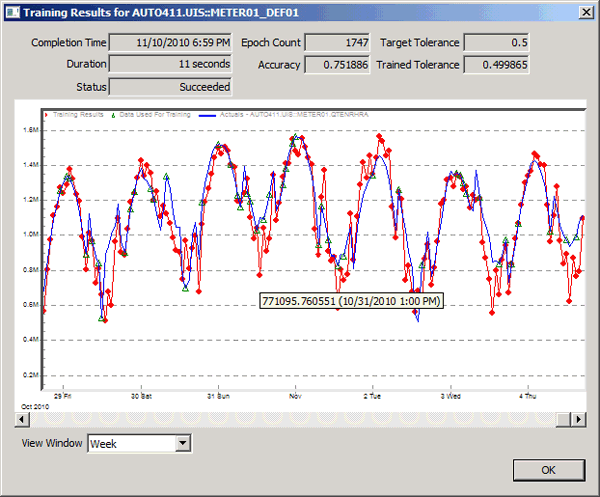
You can view the training results for the last training operation for a trained neural network definition associated with meter or meter group. The Training Results dialog box is accessed by right-clicking on a neural network definition in the Neural Nets page, or clicking Training Results on the Neural Network Definitions Settings dialog box.
Hover over any data point on the training results to view the value. You can also zoom in to view any section of the graph by clicking and dragging the cursor. To return the trend to 100% right-click and select Undo Zoom on the context menu.
Note: Neural network definition Training Results are in memory only, and are not written anywhere in the CygNet System.
To View Training Results for a Neural Network
The properties on the Training Results dialog box are described below.
| Parameter | Description |
|---|---|
|
Indicates the time the training operation finished processing. |
|
|
Duration |
Indicates how long the training operation took to complete. |
|
Status |
Indicates the status of the last training operation: Succeeded or Failed. |
|
Epoch Count |
Indicates the number of training iterations performed in the training session. |
|
Accuracy |
Indicates the forecast accuracy calculated by applying the trained neural network to the entire set of training data specified, not just the selection of hours used for training. |
|
Target Tolerance |
Indicates the accuracy threshold required to determine that the training process was successful. |
|
Trained Tolerance |
Indicates the trained tolerance achieved at the completion of the training process. If this number is less than the Target Tolerance, then the training process is considered to have met its training target goal. |
|
Select Day, Week, Month, Year, or All to change the view presented. |
|
|
View Errors |
Click View Errors to view errors that were encountered while loading the graph. |

|
|
|

