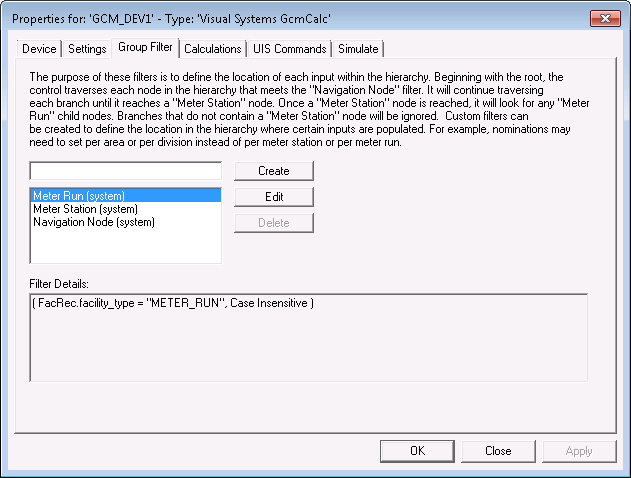
Use the Group Filter page to configure the group filters that define the location of each input within a hierarchy.
The control begins at a root node and travels to each node in the hierarchy that meets the navigation node filter rules. Navigation nodes include meter station and meter run nodes. Branches without a meter station node are ignored. You can create custom filters to further define special locations in the hierarchy where inputs can be populated.
The fields configured on this page also need to be configured on the Filters properties page of the GCM Nomination Grid. See Using CygNet Filter Rules for a general discussion on using CygNet filter rules.
|
|
| Sample Group Filter Page |
The following table lists and describes the fields found under the Group Filter page.
| Parameter | Description |
|---|---|
|
Create |
Use this field to create user-defined group filters that define special input locations in the hierarchy. For example, your architecture might require nominations to be set on a per area or division basis, not merely on a meter station or meter run basis. |
|
Edit |
This field is populated with three default filter types: Meter Run (system), Meter Station (system), and Navigation Node (system). Click Edit to change rule details. |
|
Delete |
Use this button to delete unwanted user-defined filters. You cannot delete the three default filter types: Meter Run (system), Meter Station (system), and Navigation Node (system). |
|
Filter Details |
This read-only field populates with rule details for any filter type selected in the filter list. Click Edit to change rule details. |
More:

|
|
|


