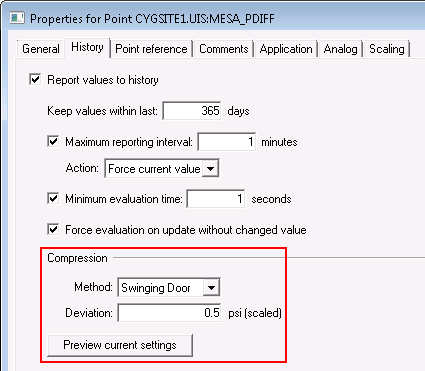
by using these settings
CygNet Software provides additional options for limiting the number of historical real-time values forwarded to the VHS from the CygNet Current Value Services, thus reducing storage requirements and improving performance of the VHS datastore. The supported options are:
These options are configured in the point's configuration record on the History page of the PNT editor:
|
|
| Further reduce the amount of data reported to the VHS by using these settings |
Considerations for Maximum reporting interval and Minimum evaluation time will be evaluated before applying the compression settings. For example, if a new value is received by the CVS that exceeds the configured Maximum reporting interval, it will be sent to the VHS directly regardless of whether it exceeds any compression settings. Additionally, new values will always be sent to the VHS if their status bits have changed from one value update to the next, if the timestamp of the new value received is older than the previously received value, or if the value received is non-numeric.
CygNet Swinging Door compression is best used to reduce historical values that arrive in a smooth continuous way with relatively small changes, for example, process data, such as pipe pressure, or temperature values. This method can be used to characterize a data curve by keeping only necessary values that represent the general trend curvature of the data. CSD compression is better at retaining the profile of the data curve.
For data that increments in steps where the rate of change is small, such as valve positions or tank levels, History Deadband compression is a better method for reducing historical values. History deadbanding discards small changes in values within the deadband range and retains only greater changes that cross the configured threshold boundaries.
Both methods apply only to numeric values received by points of analog point data type. Swinging Door is the default option for new analog points. Each method is described in the following topics.
A Compression Preview option is also available to simulate data reduction using the current history settings. Using the Compression Preview dialog box, you may experiment with the various settings to evaluate the statistical and graphical results before committing the settings to the PNT record.
Note: The Compression Deviation (compressiondeviation) attribute replaced the History Deadband (historydeadband) attribute, which is now obsolete, although the old attribute has been retained for backwards compatibility.
Not all data goes through normal point processing (alarm and notification processing, compression) prior to being forwarded to the CygNet Historian. In some cases historical real-time values are not compressed, even though compression settings have been configured for the point.
Historical data consists of data items associated with timestamps, for example, a field device reporting differential pressure within a set of hourly history records. Whenever the CVS retrieves "historical data" from a device — specifically values that have associated timestamps on the device — CygNet takes one of two courses of action:
None of the historical data is compressed prior to being forced to the VHS. This behavior is intended to accurately represent historical data from the device in the SCADA system and cannot be altered.
An array data item is similar to an "historical" item in that it contains multiple values, but it doesn't include a timestamp, for example, DynaCard data showing load versus position plots from a pump-off control (POC) device. CygNet does not perform point processing on non-historical array data because a current value cannot simultaneously contain multiple values.
In cases where high density historical data has been written to the historian (uncompressed), the data can be thinned with utilities, such as the VHS Data Thinner Utility.
More:
 CygNet Swinging Door Compression

|
|
|

