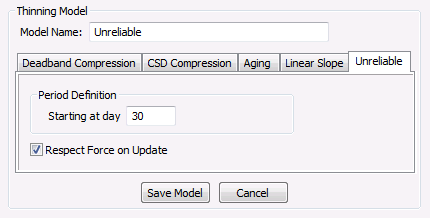
The unreliable thinning model deletes all records for all point types (analog, digital, enumeration, and string) that are marked as unreliable.
| Property | Description |
|---|---|
|
Starting at day |
Specifies the number of days between today and timestamp of an entry. Must be a value greater than 0; no thinning can occur on entries from the current day. Example A day value of 60 would correspond to all entries at least 60 days older than today. |
|
Respect Force on Update |
If enabled, the thinning rule will respect the Force Evaluation on Update without changed value setting for each point record. If Force Evaluation on Update is not enabled, any value that is identical to the previous value will be deleted, after deleting all unreliable values. Note: This option allows the history values to appear as if no unreliable records were ever sent to the VHS. |
To Create an Unreliable Thinning Model
To Edit an Existing Unreliable Thinning Model
|
|
| Sample Unreliable Thinning Model |
In the example above, history values newer than 30 days would not be subject to thinning. All values for all point types that are marked as unreliable and older than 30 days would be thinned. Additionally, if Force Evaluation on Update is not enabled for a point record, any value that is identical to the previous value will be deleted, after deleting all unreliable values.

|
|
|

