History > VHS Utilities > VHS Import/Export Utility > Configuring Source Options

Configuring Source Options

The VHS Import/Export Utility supports three source types: Value History Service, CSV file, and Offline datastore.

VHS Source Option

When using a VHS as the source there are some additional configuration options. These settings are described in detail below.

Option Description  

Domain and Site.Service

Specify the Site.Service for the source VHS. If importing to a VHS service on a different domain, enter the Domain.
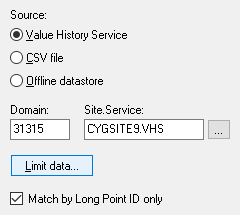
VHS source options
VHS source options

Limit data

The VHS data to be transferred can be filtered by time, value count, and point tags. Click Limit data and configure additional parameters.

Match by Long Point ID only

The utility can also be configured to Match by Long Point ID only. This option limits data added to a point in the destination VHS based on a match of the point’s long tag string (SITE.SERVICE:LONGID). This overrides the default behavior that matches points on the fully-qualified tag string (SITE.SERVICE.POINTID:LONGID).

Point IDs and Long IDs are typically generated by the system. The Point ID is auto-numbered and the Long ID is a concatenation of the Facility ID and UDC properties.

If a tag is deleted and re-added to the system, the new Point ID will not match the old Point ID since auto-numbering will utilize the next available number in the database. The Long ID will match since the Facility ID and UDC properties will be the same.

Using this matching option forces a check based on the Long ID, which is not prone to change as is the Point ID.
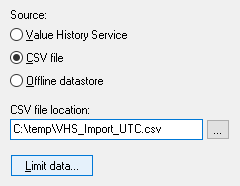
CSV File Source Option

When using a CVS file as the data source there are some additional configuration options. These settings are described in detail below.

Option Description  

CSV file location

Specify the location of the source CSV file.

CSV source options
CSV source options

Limit data

The data in the CSV file to be transferred can be filtered by time and value count.

Click Limit data and configure additional parameters.

Time Format Notes

Proceed with caution when importing from a CSV file to a VHS service.

When importing data from a CSV file to a VHS, and the data in the CSV file is stored in Local time, the time will be converted back to UTC time using the machine's local time as a reference, when it is written to the VHS. This may produce inaccurate timestamps in the VHS if the machine’s time is different from the time of the machine that produced the export.

Also be careful when exporting data from a host where with Daylight Saving Time (DST) is turned off, and importing to a VHS with DST turned on.

See Time format for the Destination option for more information about time formats.

Offline Datastore Source Option

When using an offline datastore as the data source there are some additional configuration options. These settings are described in detail below.

Option Description  

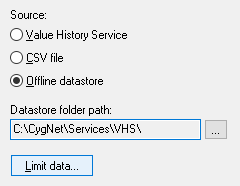
Datastore folder location

Specify the path of the source datastore folder.

Note: If the offline datastore is split (for example, the main datastore file (history.edb) is in one location and the transaction log files (\txlogs) are in another location) the VHS Import Export utility will determine this from the service configuration file.

Offline datastore source options
Limit data

The data in the offline datastore to be transferred can be filtered by time and value count.

Click Limit data and configure additional parameters.


More:

Back to top

Let us know how we can improve this topic.

CygNet at weatherford.com

© 2020 Weatherford. All rights reserved.