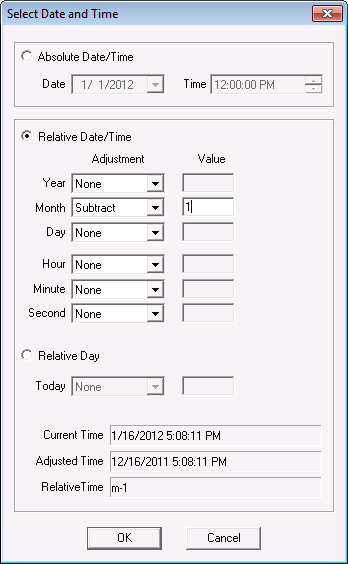
(Relative Date: one month earlier)
When you open the VhsMissingDataDetector, the system automatically loads the previous settings file, if one exists. The settings file contains the previous time and other criteria for finding missing history values. If you are opening the utility for the first time, enter a file name. The settings file is an XML file and has an extension of .vhx with a file name of MYSITE.Vhs. If you want to use a different settings file for finding points that are missing values in the VHS, click Load and navigate to that file and open it.
In the Settings section, you have a choice of either an absolute or a relative date for either the start or end time for finding any missing point values from a valid VHS. You then specify how many seconds, minutes, hours or days for the incremental period between missing values and how many must meet the criteria before a missing list of values is displayed.
| Settings | Description |
|---|---|
|
VHS |
Select a valid VHS in the format Site.Service. |
|
Start Time |
Specifies the start time, which is the beginning time and date range for finding any missing history values and can be either relative or absolute. |
|
End Time |
Specifies the end time, which is the end time and date range for any missing history values and can be either relative or absolute. |
|
Period |
Specifies a time interval in either seconds, minutes, hours, or days between one missing point value in the VHS and another missing point value. For instance, if 10 minutes is entered for the time period, then each point listed in the Results pane will show an incremental interval of 10 minutes (for example, 10:25, 10:35, 10:45). |
|
Minimum Required |
Specifies how many missing values must exist in the specified time interval, set in the time range and period, before there can be a list of missing points. The default or minimum is 1 for one history point value. As such, if you have only 10 point values that did not report to the VHS from a CVS and you enter 11 in Minimum Required, no missing history values will be displayed even though all other time criteria is met. |
To find missing history values for points, you create a time range. The following shows a relative date and an adjusted time. The adjusted time is based on the current system time, plus or minus a time value. For instance, you can subtract or add days, months, etc. In the following example, the adjusted time (1/16/2012 5:08:11PM) is one month earlier (m-1) from the current system time (12/16/2011 5:08:11PM):
|
|
| Select Date and Time (Relative Date: one month earlier) |

|
|
|

