Open the CygNet Client Installer (Start Menu > All Programs > CygNet > CygNet Client Installer). The CygNet Client Installer/Launcher dialog box will be displayed.
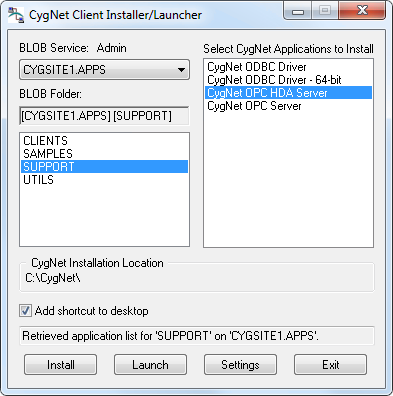
This topic describes the following:
The CygNet OPC HDA Server can be installed using the CygNet Client Installer (CInstall.exe) utility; the application can be found under SUPPORT. The CygNet Client Installer sets up integrated version management to ensure that you have the latest version of the application files and that all files are registered properly. See CygNet Client Installer for more information.
Note: The CygNet OPC HDA Server now includes updated OpcFoundation OPC Core Components and will upgrade these system-level components automatically when you version manage the executable. See OPC Core Components for more information.
The following files are necessary for installing the CygNet OPC HDA Server.
Found in the APPS\SUPPORT folder and installed to the CygNet\Support\CygNetOPCHDA folder:
Found in the APPS\SUPPORT folder and installed to the Windows\SysWOW64 folder:
To Install the CygNet OPC HDA Server Using the CygNet Client Installer
Open the CygNet Client Installer (Start Menu > All Programs > CygNet > CygNet Client Installer). The CygNet Client Installer/Launcher dialog box will be displayed.
Note: If your CygNet\Support\CygNetOPCHDA folder does not have the version management files required to install the OPC HDA server (.rsp and .app files), contact CygNet Support.
The name of the CygNet OPC HDA Server is: CygNet.OPCHDAServer.1.
 is displayed in the task bar. in the task bar and then clicking Shutdown Server.
The server supports only manual point registration; no points can be accessed through the browsing interface. The server recognizes CygNet points in the following formats:
Example: MYSITE.OPCIS:OPCTESTGRP1_RAND1

|
|
|

