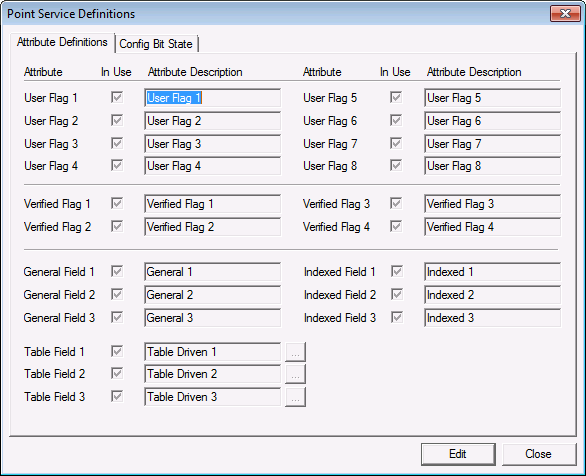
You can specify custom default configuration values to be used when initially creating points in your system. The PNT metadata file stores these default configuration options, so that settings can be configured per point scheme, per point type, or per long tag, for specified attribute definitions and configuration bit states. The available options affect enabling the alarm, reporting it to the CAS, and reporting it to the GNS.
Note: This does not include options for default alarm setpoints.
Default configuration bits apply only when creating a new blank record. They do not apply when copying a record to create the new point or when editing an existing record.
Point (PNT) configurable bits are completely customizable and give administrators the option to pre-configure flags for each point attribute, attribute descriptions, combinations of point schemes if being used, setting default alarm and reporting conditions, etc. Configuring these attributes and alarm conditions can assist with standardizing points when they are created or defined.
Once you configure default options for the points on the Config Bit State page, and save your settings, the default Config Bit states are applied to the point whenever a new record is created. The default bits will also be applied if you edit existing point properties such as the Site.Service, Facility ID, Uniform data code, Long point ID, Point scheme, Point type, etc. properties for any existing points.
When you create a new point by copying an existing record, the default config bits will be cleared. The bits from the source record will be applied before the defaults, assuming they are the same point type.
When enabled, enforcement or validation of the configurable bit settings occurs in two places. The validation step will mark all issues as warnings; to notify an end user that an error has been detected if the Configurable Bit conditions have been changed. The warning offers you the opportunity to edit the values or to ignore them and use the default values.
Changes to point configurations are stored in the Points metadata file (PNTMetaData.dat) in the CygNet\Services\PNT directory on your host server.
You must have the required authorization level (5 - Admin) to configure default configuration values. See PNT Security (ACCESS) for information about configuring security access to set point configuration defaults.
To Configure Point Service Definitions
The Attribute Definitions page stores all the default attributes and descriptions for the points attributes. These options can be configured prior to point creation, to assist with the creation of newly defined points or when editing existing point attributes within the system to assist with standardization. Editing any of these attributes allows for global configuration of all point information.
See PNT Editor - Application Properties for more information about the default settings, their values, or where these items are displayed.
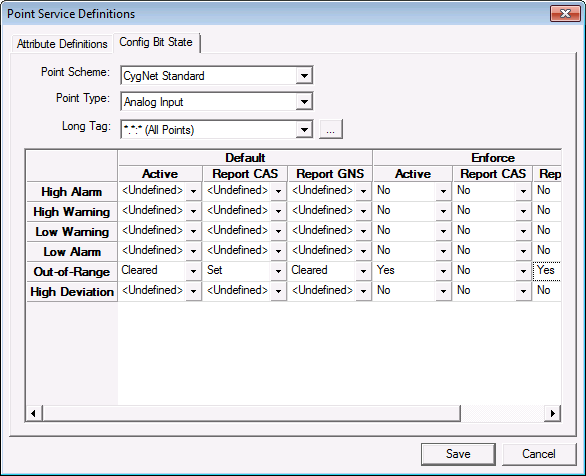
Use the Config Bit State page to pre-configure any of the default settings for PNT records, including Alarm Bit states for all Point Types. Preconfigured settings can be selected with a predefined Point Scheme, default Alarm, callout and condition.
| Option | Description |
|---|---|
|
Point Scheme |
Select the point scheme to be used. Multiple point schemes are available, as configured for your system, including CygNet Standard (point scheme 0) and the optional CygNet Enhanced. See Point Schemes for more information. |
|
Point Type |
Select the point type to configure with these predefined settings. Possible values are:
See Point Types for more information. |
|
Long Tag |
Select the Long Tag name or names to set with the default settings. Optionally, use the browse button to utilize the Tag Filter options to assist with searching. Use the Long Tag wildcard to specify different requirements for specific CVSs and/or Facility UDCs. |
|
Default |
Select the default alarm state values to use for the Active status, and the reporting status for the Report CAS and the Report GNS for each point. Possible values are:
|
|
Enforce |
Select whether or not to enforce the validation check for the Active status, and the reporting status for the Report CAS, and the Report GNS for each point, and to display WARN error messages when a PNT contains values that are incorrect or blank. Possible values are:
Enforcement applies when creating new records or editing existing records. |

|
|
|

