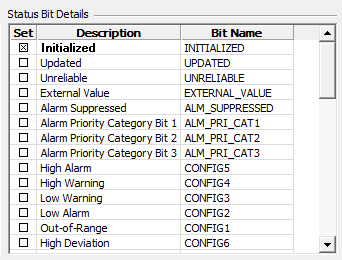
The StatusBits element is the parent node that defines all status bits for the specified point scheme. The point state is based on the status bits, which are associated with point types. Status bits report alarms to the CAS and GNS as well as determine which Point State Instances are active. See Point Status Bits for more information on status bits.
The following table lists and describes the properties of the StatusBits element.
| Property | Description |
|---|---|
|
Case Sensitive |
Yes |
|
Required |
Yes |
|
Number of Instances Allowed |
1 |
|
Requires End Tag |
Yes |
|
Parent Element |
|
|
Child Element |
The StatusBitsForScheme element is the parent node that defines the status bit definitions for the specified point scheme.
The following table lists and describes the properties of the StatusBitsForScheme element.
| Property | Description |
|---|---|
|
Case Sensitive |
Yes |
|
Required |
Yes |
|
Number of Instances Allowed |
1 |
|
Requires End Tag |
Yes |
|
Parent Element |
|
| Child Element | StatusBitDefinitions |
| Attribute |
pointschemes |
The following table lists and describes the attribute generally applicable to the StatusBitForScheme element.
| Attribute | Description |
|---|---|
|
pointschemes |
Assigns all status bits defined in the child elements to a point scheme. |
The StatusBitDefinitions element is the parent node that defines the status bit definition for each specific point type.
The following table lists and describes the properties of the StatusBitDefinitions element.
| Property | Description |
|---|---|
|
Case Sensitive |
Yes |
|
Required |
Yes |
|
Number of Instances Allowed |
Unlimited |
|
Requires End Tag |
Yes |
|
Parent Element |
|
|
Child Element |
|
|
Attribute |
pointtypes |
The following table lists and describes the attribute generally applicable to the StatusBitDefinitions element.
| Attribute | Description |
|---|---|
|
pointtypes |
Assigns the StatusBitDefinitions to a particular point type. Note: pointtypes="*" is supported as a wild card. Multiple point types can be specified by separating each with a comma. |
The following example displays the status bit assigned to all point types (as designated by the "*" in the "pointtypes" attribute) of the point scheme.
|
<StatusBits> <StatusBitsForScheme pointschemes=""> <StatusBitDefinitions pointtypes="*"> </StatusBitDefinitions> </StatusBitsForScheme> </StatusBits> |
The StatusBitDefinition element is the parent node that defines the bitid, displayorder, and calculation parameters for each specific point type.
The following table lists and describes the properties of the StatusBitDefinition element.
| Property | Description |
|---|---|
|
Case Sensitive |
Yes |
|
Required |
Yes |
|
Number of Instances Allowed |
Unlimited |
|
Requires End Tag |
No |
|
Parent Element |
|
|
Child Elements |
CalcParameter1 (optional) CalcParameter2 (optional) Reference (optional) |
|
Attributes |
bitid desc displayorder calcorder calctype active |
The following table lists and describes attributes generally applicable to the StatusBitDefinition element.
| Attribute | Description |
|---|---|
|
bitid |
Uniquely defines the status bit and is predefined. Referenced by the point state instance in order to use the status bit with a match method. The bitid appears as the Bit Name in the Status Bit Details field of the Point Properties dialog box as shown below. |
|
desc |
Appears on both the Analog/Digital/Enumeration/String Alarm Settings page of the PNT Editor as the alarm name and in the Description column in the Status Bit Details field of the Point Properties dialog box. |
|
displayorder |
Determines the order in which the status bits are displayed in the Status Bit Details field of the Point Properties dialog box. Value:
|
|
calcorder |
Sets the order in which a CVS performs calculations for a configurable bit. This is useful in situations where one configurable bit is configured in such a way that it is dependent on the calculation of another configurable bit. Note: For status bits using calculation types of SYSTEM or EXTERNAL, the calcorder should be set to "-1". |
|
calctype |
Sets the calculation type that determines if the status bit should be set. Calculation types are SYSTEM, EXTERNAL, and Alarm calculation types, which are assigned to configurable alarm status bits in the CvsMetadata file. |
|
active |
Specifies whether a status bit is active in the point scheme. This attribute is not required. If not included in the CvsMetadata file, the status bit defaults to active="true". If set to active="false", the status bit will not appear in the list of status bits for a point. Value:
|
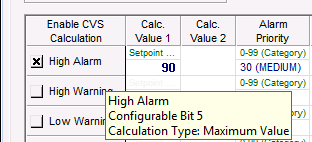
The following image shows the area of the Analog Alarm Settings page of a PNT Editor displaying an enabled CVS calculation for a High Alarm maximum value threshold. See Alarm Calculation Types.
|
<StatusBits> <StatusBitsForScheme pointschemes=""> <StatusBitDefinitions pointtypes=""> <StatusBitDefinition bitid="" desc="" displayorder="" calcorder="" calctype=""> <CalcParameter1 desc=""/> </StatusBitDefinition> <StatusBitDefinition bitid="" desc="" displayorder="" calcorder="" calctype=""> <Reference id=""/> </StatusBitDefinition> </StatusBitDefinitions> </StatusBitsForScheme> </StatusBits> |
The CalcParameter1 element defines the alarm calculation type used for Calc. Value 1 shown on the Analog/Digital/Enumeration/String Alarm Settings page of a PNT Editor. CalcParameter1 is only used on configurable bits with applicable calculation types.
The following table lists and describes the properties of the CalcParameter1 element.
| Property | Description |
|---|---|
|
Case Sensitive |
Yes |
|
Required |
No |
|
Number of Instances Allowed |
1 |
|
Requires End Tag |
No |
|
Parent Element |
|
|
Attribute |
desc |
The following table lists and describes the attribute generally applicable to the CalcParameter1 element.
| Attribute | Description |
|---|---|
|
desc |
Specifies the description used for the alarm calculation value. |
The CalcParameter2 element defines the alarm calculation type used for Calc. Value 2 shown on the Analog Alarm Settings page of a PNT Editor. CalcParameter2 is only used on configurable bits with applicable calculation types.
The following table lists and describes the properties of the CalcParameter2 element.
| Property | Description |
|---|---|
|
Case Sensitive |
Yes |
|
Required |
No |
|
Number of Instances Allowed |
1 |
|
Requires End Tag |
No |
|
Parent Element |
|
|
Attribute |
desc |
The following table lists and describes the attribute generally applicable to the CalcParameter2 element.
| Attribute | Description |
|---|---|
|
desc |
Specifies the description used for the alarm calculation value. |
The Reference element defines the status bits or PNT attributes used for the calculation type.
The following table lists and describes the properties of the Reference element.
| Property | Description |
|---|---|
|
Case Sensitive |
Yes |
|
Required |
No |
|
Number of Instances Allowed |
Unlimited |
|
Requires End Tag |
No |
|
Parent Element |
|
|
Attribute |
id |
The following table lists and describes the attribute generally applicable to the Reference element.
| Attribute | Description |
|---|---|
|
id |
Specifies the name of the status bit or PNT attribute used for the alarm calculation. |

|
|
|

