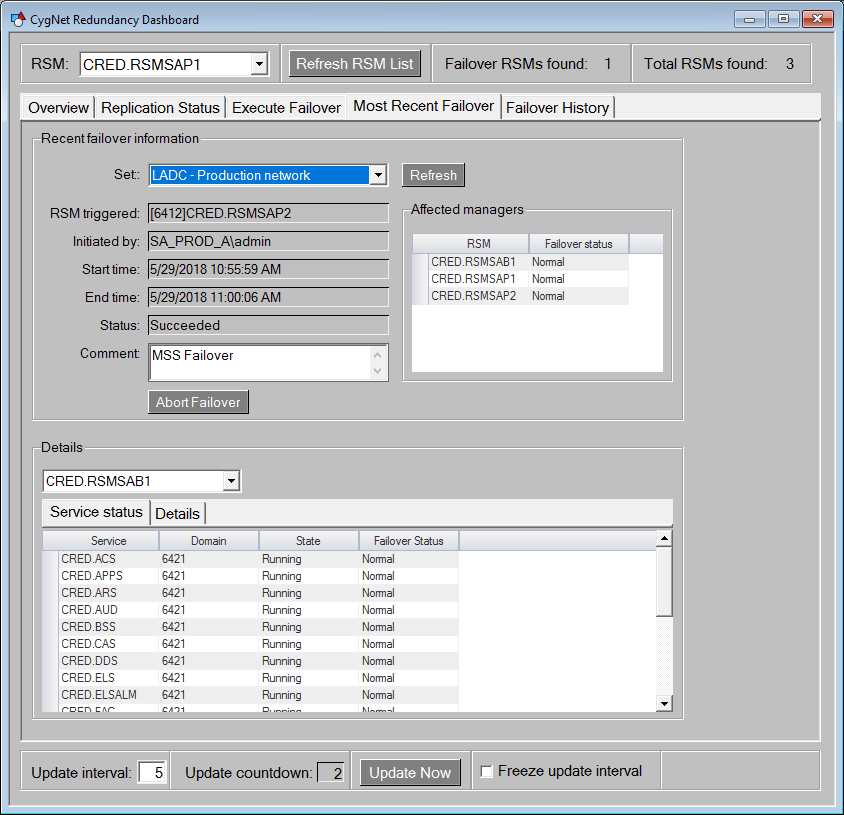
The fourth page of the CygNet Redundancy Dashboard is the Most Recent Failover.csf screen, which lists information about the most recent failover, such as the RSM that triggered the failover, start time and end time, failover status, and service status. This screen also contains an Abort failover option.
Click the following image to see a sample Most Recent Failover screen:
The Most Recent Failover page contains the following elements:
| Object | Description |
|---|---|
| Recent failover information | |
|
Set |
A drop-down menu showing all the redundant sets. Select the appropriate set to view details for the most recent failover. |
|
RSM triggered |
The name of the redundant RSM that triggered the most recent failover. |
|
Initiated by |
The name of the user who initiated the most recent failover. |
|
Start time |
The start time of the most recent failover. |
|
End time |
The end time of the most recent failover. |
|
Status |
The current status of the most recent failover. |
|
Comment |
Type a comment about the most recent failover. |
|
Abort Failover button |
Click to abort a failover. The failover can only be aborted if its Status is In Progress. |
|
Refresh button |
Click to refresh the data presented on the page. |
|
Affected managers grid |
A Generic Grid object showing all service managers that are affected by this failover. The columns include:
|
| Details | |
|
Details Combo box |
A drop-down menu showing all the known service owners of the selected redundant set. This drives the content of the Service status grid and the Log Details tabs. |
|
Service status grid |
A Generic Grid object showing all the services whose failover status is not Normal. If all services in the Affected managers above are Normal, this grid will be empty. As the services proceed through the failover sequence you will see that status reflected here. The columns include:
|
|
Details grid |
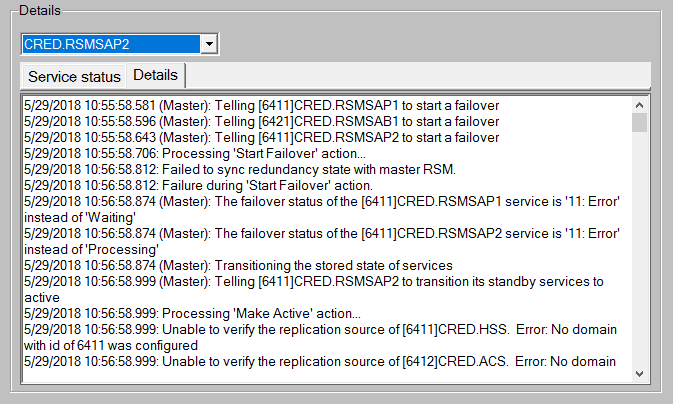
Log file details for the most recent failover. Also see the FailoverEventLog.log file found in the RSM folder for every redundant site. Click the following image to see sample Details screen:
|

|
|
|