GNS Component-Level Security
GNS component-level security can be administrative, operational, or both. Administrative security governs who can access a notification record. Operational security governs who can manage the messages in the notification queue, including the acknowledgment of notification via the queue or via email. Operational security can be applied only to records for which the type is “Event.”
By applying GNS component-level security you can:
- Allow a user to make changes to change his/her address record, such as changing a blackout, without being able to access any other records.
- Allow all users to view the pending notifications (i.e., the queue).
- Allow users to acknowledge notifications online only for select events.
- Allow select users to delete messages from the queue.
You must have at least Level 2 authorization for the service’s ACCESS event to change the properties of a record.
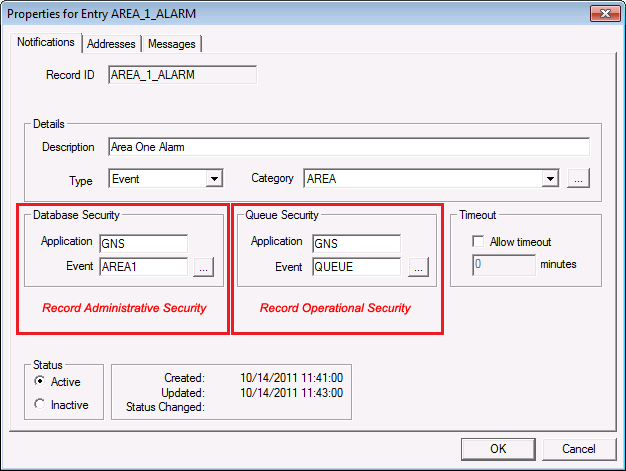
Regardless of the Application and Event name assigned to the security properties in the notification record, the operational tasks (and the authorization level required to perform a task) are the same as those governed by the DDS ACCESS Event.
To Configure GNS Component Administrative Security
- In the ACS, create an Application and Event for the GNS record and define permissions for the Event.
- In the GNS, right-click on the record and click Properties.
- On the Notifications page, click … in the Database Security area.
- Select the Application and Event created in step 1.
- Click OK to apply the selection.
- Click OK to save the change to the device.
To Configure GNS Component Operational Security
- In the ACS, create an Application and Event for the GNS record and define permissions for the Event.
- In the GNS, right-click on the record and click Properties.
- On the Notifications page, click … in the Queue Security area. This option is available only for records for which the record type is “Event.”
- Select the Application and Event created in step 1.
- Click to apply the selection.
- Click OK to save the change to the device.


