Configuring Service Startup and Shutdown Order
You can easily configure the startup and shutdown order for services owned by any RSM using the Service Group Editor. The editor can be used to start a subset of services belonging to an RSM, and then wait for them to reach a steady state before starting the rest of the services. Alternately you can stop a subset of services belonging to an RSM, and then wait for them to reach a steady state before stopping the rest of the services.
Service startup and shutdown order is stored in the Service Definitions file (SvcDef.Rsx), found in the CygNet\RSM\ service directory.
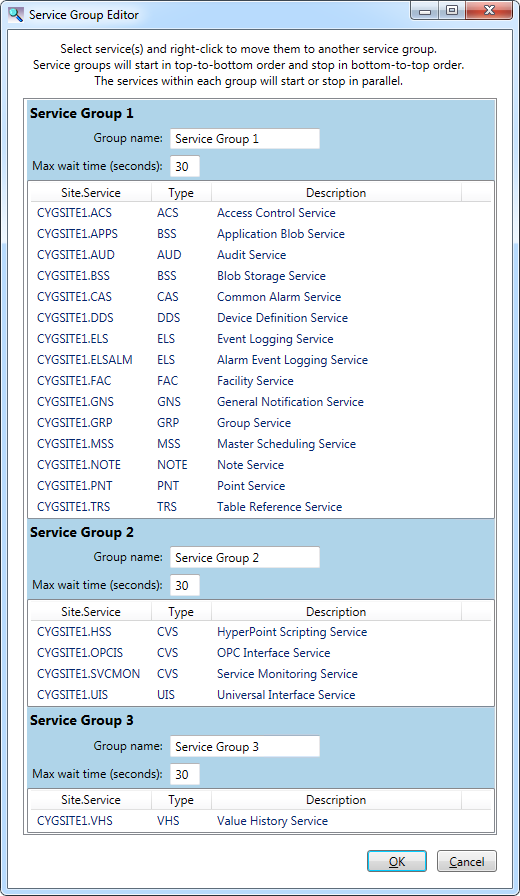
Click on the following image to see an example Service Group Editor.
To Change Service Startup and Shutdown Order
- Using CygNet Explorer, open the Remote Service Manager (RSM), which must be running.
- Right-click in the white space of the RSM service pane and select Configure Service Groups from the context menu to open the Service Group Editor. The editor displays the services owned by the RSM, which are listed in a series of Service Groups. Each group of services will startup (or stopped) after the previous group has started (or stopped).
- To create a new service group, select one or more services, right-click and select Create group n with selected service(s). A new service group will be created and the selected services will be moved to that group.
- To move one or more services to another service group, select the services, right-click and select Move to group n where n is the group you want to move the selected services.
- Specify a Group name for each service group.
- Specify the Max wait time (seconds): for each service group. This value indicates the maximum amount of time in seconds you are willing to wait for the services in that group to startup or shutdown before moving on to the next group. The default value is 30 seconds.
Startup and Shutdown Notes
Once configured the services will start or stop according to the setup specified in the Service Group Editor:
- The RSM will start and stop services per their configured group.
- If services are stopped, they will startup in the top-to-bottom order. On startup, the RSM will wait for all the services in a group to exit the "starting" state, or the Max wait time to elapse, before starting the next group.
- If services are running, they will shutdown in the bottom-to-top order. On shutdown, the RSM will wait for all the services in a group to stop, or the Max wait time to elapse, before stopping the next group.
- The services within each group will start or stop in parallel.
- If the RSM owns any ARS services, they are not displayed in any service groups, since the ARS is always the first service to start and the last service to stop.
- You can't reorder services within a service group. If you want a particular service to start (or stop) before (or after) another service, move it to a separate group.
- The Start column in the RSM Service Pane indicates the startup goup number for each service, not its order in the Service Definitions file. The ARS displays a "0" since it is not part of a startup group.
SvcDef.Rsx
SvcDef.Rsx is the RSM database file, also called the Service Definitions file. This XML file lists the services in the order they will be started or stopped by the RSM. If necessary, you can edit this file using a text or XML editor to change the order, although best practice recommends using the configuration method described above.
Automatic Shutdown of Services
You may find it useful to have a means of shutting down one or more CygNet services without requiring user intervention outside a failover scenario. Each of the following methods requires an external trigger to initiate the shutdown, such as a command from a battery backup’s control software or a failover script.
Perform one of the following options to initiate an automatic shutdown of CygNet services: