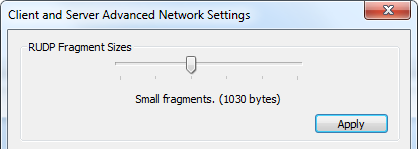
Use Advanced Network Settings to configure Reliable User Datagram Protocol (RUDP) Fragment Sizes and view Network Address Translation (NAT) settings.
CygNet Software uses the Reliable User Datagram Protocol (RUDP) for the transmission of packets between network end points. This is true even if the end points are on the same machine. As a transport layer protocol, RUDP packages data into datagrams (or packets). It then frames the packet with additional header information required at the lower level in the network stack. A frame contains three fields: address, payload (data), and error checking.
The data link layer almost always poses limits on the maximum frame size. This size is referred to as the maximum transmission unit (MTU). Ethernet has a standard frame of 1500 bytes. If the frame is larger than the MTU, it is broken up into smaller packets in a process referred to as "fragmentation." A software application can define its default fragment size, although the optimal fragment size depends on the application and the network. CygNet has default fragment size of 1218 bytes. (A maximum size CygNet message is 4120 bytes.)
Underlying network components such as routers, switches, NICs, etc. may have a smaller MTU than Ethernet, and in such cases the link (or interconnect) will fragment the packet again. Each IP fragment carries information about which part of the original IP packet it contains. The fragments are re-assembled by the receiving IP host and passed to the higher protocol layer.
While a larger packet can carry more data and thus need fewer packets, the downside is that a large packet will occupy a slow link for more time and cause delays to subsequent packets, thus increasing lag and latency. Furthermore, corruption in a single bit in a packet requires that the entire packet be retransmitted. Small packets can be retransmitted more quickly. At a given bit error rate, larger packets are more likely to be corrupted. On the other hand, a larger MTU means fewer packets, and in some systems per packet processing can be a critical performance limitation. For highly latent networks or network connections, it may be beneficial to use smaller fragments.
In CygNet, packets that come from the server and are sent to a client are generally large; however, there are tasks performed on a client that are not easily compressible and therefore may involve large packets being sent to the server, such as uploading files to a BLOB Storage Service (BSS) or editing Device Template Files (DTFs).
For more information, see CygNet Message Sniffer Lite Utility.
CygNet has RUDP fragment size options for both the host and the client that can be configured to reduce packet failure issues and maximize successful packet transmission. The CygNet settings for fragment size options are shown in the table below.
| Setting | Fragment Size (bytes) | Sized for |
|---|---|---|
| Default fragmentation | 1400 | |
| Tiny fragments | 534 | Smallest IPv4 MTU |
| Small fragments | 1030 | |
| Medium fragments | 1218 | Smallest IPv6 MTU |
| Large fragments | 1400 | |
| Disabled | 4120 | Max buffer receive size |
Use the following tools to change RUDP Fragment Sizes, as necessary:
The RUDP Fragment Sizes setting is found under Properties > Advanced Network Settings in both utilities.
On the host machine, changing the fragment size affects only service-to-service messaging. On the client machine, changing the fragment size affects the messaging between that client and the services (both client-to-service and service-to-client).
The CygNet RUDP fragment size setting is read at startup, so if you change the value you must restart all software components to which you would like the change applied. If the change is on the host machine, you must restart the CygNet services. If the change is on the client machine, you must restart the CygNet client applications.
Several RUDP-related info items can be used to monitor RUDP packet receipt, corruption, cancellation, failures, etc.
See Network Info Items for more information.
NAT Service and Client addresses can also be viewed on this dialog.
See Network Address Translation for more information.

|
|
|

