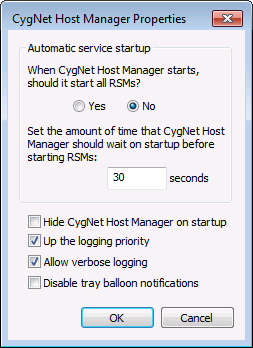
Use CygNet Host Manager Startup Options to specify if services automatically start when CygNet Host Manager starts, to set a delay time to start RSMs, and to select logging options and tray balloon notification display. Startup options can also be invoked when starting the utility via the command line.
To Configure Startup and Logging Options
The properties on the CygNet Host Manager Properties dialog box and the corresponding command-line parameters are described below.
| Option | Description | Command-Line Parameter |
|---|---|---|
|
Automatic service startup |
||
|
Start all RSMs? |
|
-R |
|
Wait time before starting |
Specify the amount of time in seconds to wait after system startup before starting RSMs. The option is only applicable if services are set to run as a user process. |
N/A |
| Additional Options | ||
|
Hide CygNet Host Manager on startup |
Click the check box to select/clear the option to start CygNet Host Manager in a minimized state. |
-H |
|
Up the logging priority |
Click the check box to select/clear the option to increase the detail level of information captured in the log file. The CygNet Host Manager log (CHostMgr001.log) resides in the folder from which the utility is run. |
-U |
|
Allow verbose logging |
Click the check box to select/clear the option to increase log detail levels for troubleshooting purposes. Provides more detail than the Up the logging priority setting. |
-V |
|
Disable tray balloon notifications |
Click the check box to select/clear the option to disable pop-up notifications when services are controlled by right-clicking on the CygNet Host Manager icon. |
-D |

|
|
|

