
Some archive-type data groups can be assigned a Base UDC.
Data groups with elements that represent related aspects of the same thing can use a Point Value Base UDC to represent the data group as a whole. When a Point Value Base UDC is assigned to a data group, the system generates other child UDCs based on that Point Value Base UDC.
Example
The device has a data group that tracks daily history for static pressure (Daily Archive Data). The data group represents static pressure as a whole, but elements of the data group represent hourly values, daily average, daily maximum, and daily minimum. As such, if you assign PSTATIC as the Point Base Value UDC, and the system auto-generates other UDCs based on that UDC, for example, PSTATICH, PSTATICD, PSTATICX, and PSTATICN.
|
|
UDC |
Description |
|---|---|---|
|
Base UDC |
PSTATIC |
Static Pressure |
|
System-Generated UDCS |
PSTATICH |
Static Pressure - Hourly Average |
|
PSTATICD |
Static Pressure - Daily Average |
|
|
PSTATICX |
Static Pressure - Maximum Daily Average |
|
|
PSTATICN |
Static Pressure - Minimum Daily Average |
To Assign a UDC as the Base UDC
Note: This data group does not have an element with PSTATIC assigned to it. That is because none of the elements are for instantaneous static pressure.
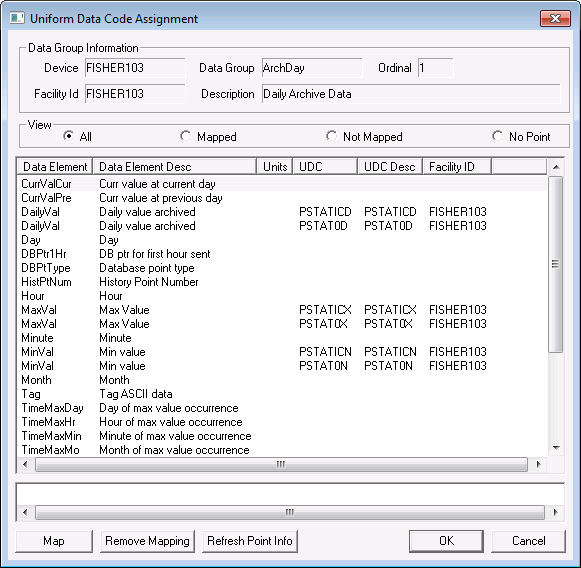
Note: System-generated UDCs are not added to the TRS and do not have a description. You can manually add these UDCs to the TRS.

|
|
|

