The Current Values page in the Universal Interface Service (UIS) pane displays current values and statistics applicable to individual points. The point values and statistics displayed are for those points configured in an associated Point Service (PNT).
For information about configuring points, see Points.
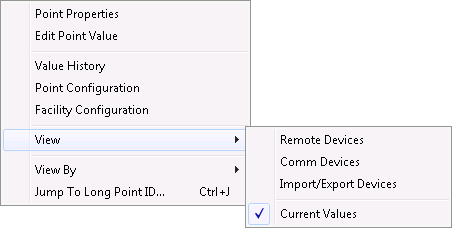
The following table lists and describes Current Values context menu options.
| Option | Description |
|---|---|
|
Point Properties |
Opens a Point Properties dialog box that provides extensive details on the selected point. Also provides access to Point Configuration and several history types. See Point Properties. |
|
Edit Point Value |
Opens an Edit value for… dialog box that provides a way to override a point's current value. See Edit Point Value. |
|
Value History |
Enables you to access current value information. See History Records, Viewing History Records Graphically, and Modifying History Data. |
|
Point Configuration |
Enables you to open the relevant point editor. See PNT Editor. |
|
Facility Configuration |
Enables you to open the facility editor for this point's facility. See Facilities. |
|
View |
Displays options to view the Remote Devices, Comm Devices, Import/Export Devices, and Current Values pages. |
|
View By |
Opens a list of options for prioritizing how points are displayed in the Current Values page. |
|
Jump To… |
Based on the View By option selected, enables you to search for specific current value records. |
The following table lists and describes Current Values values and statistics.
| Column | Description |
|---|---|
|
Alt. Units |
Displays alternate units of measure for the current value. Corresponds to alternate units specified for the applicable point's configuration. |
|
Alt. Value |
Displays the current value as converted by the specified alternate units. |
|
Description |
Displays a description of the applicable point for the current value. May be overwritten in the applicable point's configuration. |
|
Facility |
Displays a Facility ID for the current value. May be overwritten in the applicable point's configuration. |
|
Long |
Displays a description of the applicable point for the current value. May be overwritten in the applicable point's configuration. |
|
Long Point ID |
Displays a combination of facility and UDC for the current value. |
|
Point ID |
Displays a system-generated unique ID for the current value's point record. |
|
Timestamp |
Displays the last time that the current value was updated. |
|
UDC |
Displays the UDC mapped to the current value's point record. |
|
Units |
Displays primary units of measure for the current value. Corresponds to primary units specified for the applicable point's configuration. |
|
Value |
Displays the applicable current value for the point. Varies depending on point type. |
More:

|
|
|


