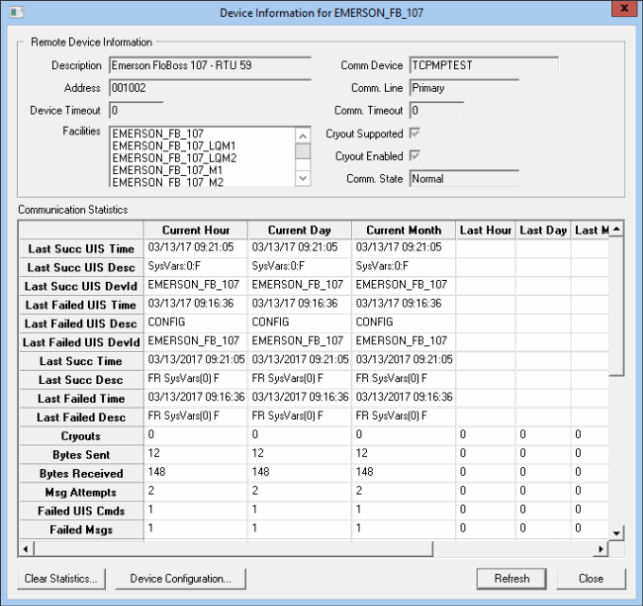
The Details option on the Remote Devices context menu opens a Device Information dialog box for the highlighted remote device. The dialog box provides a more fine-grained set of device details, as well as access to the remote device's configuration.
Click the following image to see a sample Device Information dialog box:
The following table lists and describes Device Information properties.
| Property | Description |
|---|---|
|
Description |
Displays the device Description as configured in the DDS. |
|
Address |
Indicates the device-specific address as defined in the DDS. Might be a concatenation of different values. |
|
Device Timeout |
|
|
Facilities |
Lists every facility with which this device is associated. |
|
Comm Device |
Displays the communication Device ID as it is configured in the DDS. |
|
Comm Line |
Displays the type of communication device currently being used for communication by the remote device. Options include Primary, Device 2, and Device 3. Options may vary if automatic failover is activated or if a user has manually specified the comm device to be used. |
|
Comm Timeout |
|
|
Cryout Supported |
Indicates whether cryouts are supported for the selected device. |
|
Cryout Enabled |
Indicates whether cryouts are enabled for the selected device. |
|
Comm State |
Indicates the operational state of the device. Values include the following:
|
|
Clear Statistics |
Enables you to permanently delete all statistics for the device. Upon clicking this option, you are asked to specify a time period. |
|
Device Configuration |
Opens the device editor for the selected device. |
The following table lists and describes the rows in the Communication Statistics table. Values and statistics displayed may be for the Current Hour, Current Day, Current Month, Last Hour, Last Day, Last Month, and Since UIS Restart.
| Row | Description |
|---|---|
|
Last Succ |
Displays the time of the last successfully processed UIS command. Corresponds to the SYCSLSUT system UDC. |
|
Displays the name of the latest successfully processed UIS command. Typically, this will display the UIS command name followed by the command parameters (in the format UISCMD:PARAMS). If the UIS command is DG_T_DEV, DG_F_DEV, FMSGET, or FMSSET, the string will instead be in the format DGTYPE:DGORD:CMDCHR:PARAMS, with the four fields defined as follows:
Corresponds to the SYCSLSUD system UDC. |
|
|
Last Succ UIS DevId |
Displays the device ID that the last successful UIS command was sent to. Corresponds to the SYCSLSUI system UDC. |
|
Last Failed UIS Time |
Displays the time of the last failed UIS command. Corresponds to the SYCSLFUT system UDC. |
|
Last Failed UIS Desc |
Displays the name of the latest failed UIS command. See Last Succ UIS Desc for the format of the string that is displayed. Corresponds to the SYCSLFUD system UDC. |
|
Last Failed UIS DevId |
Displays the device ID that the last failed UIS command was sent to. Corresponds to the SYCSLFUI system UDC. |
|
Last Succ Time |
Displays the time of the last successfully processed message. Corresponds to the SYCSLSCT system UDC. |
|
Last Succ Desc |
Displays a description of the latest successfully processed message. May be viewed in more detail from the Communications Data Viewer. Corresponds to the SYCSLSCD system UDC. |
|
Last Failed Time |
Displays the time of the last failed message. Corresponds to the SYCSLFCT system UDC. |
|
Last Failed Desc |
Displays a description of the latest failed message. May be viewed in more detail from the Communications Data Viewer. Corresponds to the SYCSLFCD system UDC. |
|
Cryouts |
Displays the number of currently active cryouts. Cryout statistics only display for a remote device using a Cryout Listen EIE and for the connected Cryout Listen EIE itself. Corresponds to the SYCSCRY system UDC. |
|
Bytes Sent |
The total number of bytes sent by the UIS for the time period specified. Corresponds to the SYCSBSNT system UDC. |
|
Bytes Received |
The total number of bytes received by the UIS for the time period specified. Corresponds to the SYCSBRCV system UDC. |
|
Msg Attempts |
The total number of messages (sum of Failed Msgs and Succ Msgs) sent by the UIS for the time period specified. Corresponds to the SYCSTOT system UDC. |
|
Failed UIS Cmds |
The total number of UIS commands that failed for the time period specified. Corresponds to the SYCSFUTT system UDC. |
|
Failed Msgs |
The total number of messages sent by the UIS that failed for the time period specified. Corresponds to the SYCSFTOT system UDC. |
|
Failed CRC |
The total number of messages sent by the UIS that failed because of a Cyclic Redundancy Check (CRC) issue for the time period specified. Corresponds to the SYCSFCRC system UDC. |
|
Failed No Resp |
The total number of messages sent by the UIS that failed because no response was received for the time period specified. Corresponds to the SYCSFNOR system UDC. |
|
Failed Other |
The total number of messages sent by the UIS that failed for a reason other than a CRC issue or no response for the time period specified. Corresponds to the SYCSFOTH system UDC. |
|
Success UIS Cmds |
The total number of UIS commands that succeeded. Corresponds to the SYCSSUTT system UDC. |
|
Success Msgs |
The total number of messages sent by the UIS that succeeded. Corresponds to the SYCSSTN system UDC. |
|
Success % |
The percent of messages sent by the UIS that succeeded for the time period specified. Corresponds to the SYCSSTP system UDC. |
|
Success 1st Att |
The total number of messages sent by the UIS that succeeded on the first attempt for the time period specified. Corresponds to the SYCSS1N system UDC. |
|
Percent 1st Att |
The percent of messages sent by the UIS that succeeded on the first attempt for the time period specified. Corresponds to the SYCSS1P system UDC. |
|
Success Nth Att |
The total number of messages sent by the UIS that succeeded after the first attempt for the time period specified. Corresponds to the SYCSSNN system UDC. |
|
Percent Nth Att |
The percent of messages sent by the UIS that succeeded after the first attempt for the time period specified. Corresponds to the SYCSSNP system UDC. |
|
Ave. Resp Time (ms) |
The average response time for messages for the time period specified. Measures the time from when a message was sent to when the response was received. Corresponds to the SYCSAPRT system UDC. |
|
Consecutive Failures |
The number of consecutively failed messages for the time period specified. Value resets to 0 when a message is successful. Corresponds to the SYCSFSEQ system UDC. |
|
Secs Since Success |
The elapsed time (in seconds) since the last successful communication (difference between the current time and Last Succ Time). Corresponds to the SYCSLSCS system UDC. |
|
Secs Since Failure |
The elapsed time (in seconds) since the last failed communication (difference between the current time and Last Failed Time). Corresponds to the SYCSLFCS system UDC. |
|
Total Device Drains |
The number of times unexpected data needed to be cleared from the communication channel. Corresponds to the SYCSDDTT system UDC. |
|
Last Device Drain |
Displays the time when it was last necessary to clear unexpected data from the communication channel. Corresponds to the SYCSLDDT system UDC. |
|
Last Drain DevId |
The last device attempted to be communicated with when it was necessary to clear unexpected data from the communication channel. Corresponds to the SYCSLDDI system UDC. |

|
|
|

