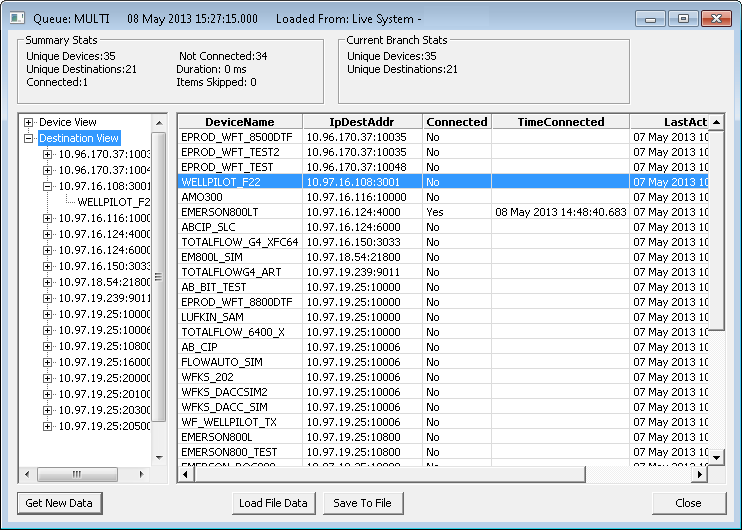
The View Connection Status option on the Comm Devices context menu for a TCP/IP MultiPoint communication device opens a dialog box that displays real-time connection statistics. This dialog box enables you to see tree views of all remote devices associated with a specific TCP/IP MultiPoint communication device as well as the IP address and port associated with each of the remote devices.
Click the following image to see a sample View Connection Status dialog box:
The following table lists and describes properties from the View Connection Status dialog box.
| Property | Description |
|---|---|
|
Action Due |
Indicates a countdown to the next time an action is due to occur on a remote device. |
|
Connect Attempted |
Indicates the time at which the last successful connect attempt between field communication device and remote device occurred. |
|
Connected |
Indicates if a remote device is connected or not to a field communication device. |
|
Connect Interval |
Displays the interval (in seconds) between attempts to reestablish connect with a field comm device if Maintain connection is enabled. |
|
Device Name |
Mirrors the Device ID field on the remote device. |
|
Hang Up Idle |
Indicates that the remote device is configured to hang up after an idle period or not. A value of 1 means True and a value of 0 means False. |
|
Idle Seconds |
The maximum duration (in seconds) to allow for inactivity. |
|
IP Destination Address |
The IP address (and port) of the field communication device (destination) that the remote device named above talks through. |
|
Last Activity |
Indicates the time at which the last activity on a remote device occurred. |
|
Maintain Connect |
Indicates that the remote device is configured to maintain connection or not. A value of 1 means True and a value of 0 means False. |
|
Next Action |
Indicates the next scheduled session maintenance. Entries can be None, Connect, Disconnect, Send Keep Alive, or Post IO. |
|
Time Connected |
Indicates the time at which the last successful connection between field communication device and remote device occurred. |

|
|
|

