The Expression Evaluator (SYSLIB_EXPREVAL) is a system library HyperPoint. It uses a script library file called EXPRESSIONEVALUATOR_SCRIPTS.TXT to build and evaluate an expression defined in a Library User HyperPoint and sets the resulting value to a target point. It has error-checking in the code. The script is triggered by changes to the points referenced in the expression. Every 10 seconds, the Library HyperPoint checks for changes to the points in the expression. The script for the SYSLIB_EXPREVAL Library HyperPoint is stored in the CygNet\Utilities\SCRIPTLIBRARY folder on your host server. The library point is installed using the CygNet Point Script Copy Utility.
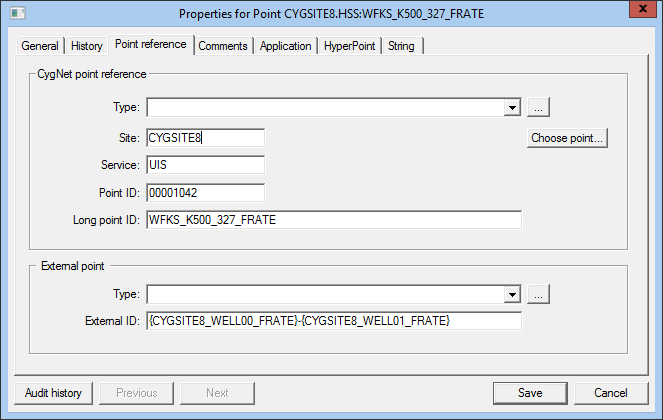
The expression is specified in the External ID field of the Point Reference page of the Library User HyperPoint. It can include any VBScript operator(s). The External ID field is limited to 256 characters.
The point identifiers in the expression must use the Long Point ID and be contained in braces. The script assumes the Site and Service reference UIS points in the same site. If not, you must identify the points using the long tag string format (Site.Service:Facility_UDC). For example, a Current Value Service other than a UIS in the same site as the HSS, and any CVS (HSS, OPCIS, SVCMON, and UIS) in another site requires the long tag string format.
In the examples in the table below, the points are within the braces, while the parentheses indicate the order of operations.
Note: If a user chooses to use relational operators, note that when you convert Boolean values to numeric types by using conversion keywords in Visual Basic, False becomes zero and True becomes -1. See the CBool conversion type.
| Sample Type | Expression (Data in same site as HSS) | Expression (Different site and service) |
|---|---|---|
|
Average |
({MESA_VGT}+{AZTEC_VGT})/2 |
({MYSITE.UIS:MESA_VGT}+{MYSITE.OPCIS:AZTEC_VGT})/2 |
|
Sum |
{MESA_VGT}+{AZTEC_VGT} |
{MYSITE.UIS:MESA_VGT}+{MYSITE.OPCIS:AZTEC_VGT} |
For more information, see the following subsections below:
The system library file EXPRESSIONEVALUATOR_SCRIPTS.TXT contains the script required to run the Expression Evaluator.
To Install the Expression Evaluator Script
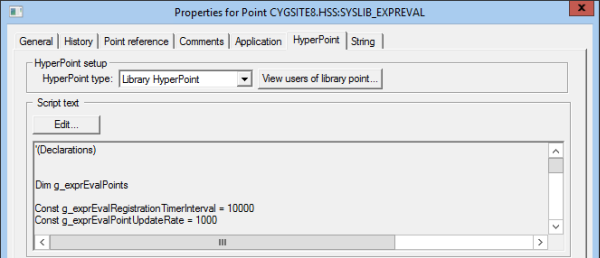
The following image displays a section of a HyperPoint page for a Library HyperPoint.

The target point can be any Current Value Service (HSS, OPCIS, SVCMON, and UIS) point.
To Create the Target Point
A Library User HyperPoint must be created to run the Expression Evaluator script.
To Create a Library User HyperPoint
The following table lists and describes some of the possible values of the script's running status.
| Value | Description |
|---|---|
| Reg:TM:<#> | RegisterExpressionPoints status. Note: Typically <#> is tag count, but can also be an error type. |
| Err:PC:EXPR | No expression indicated. |
| Err:PC:LNGID | No target point indicated. |
| Err:PC:SITE | No site indicated. |
| Err:PC:SVC | No service indicated. |
| Err:PC:PARSE | Failure to parse expression. |
| Err:PC:REPLACE | Failure to replace Long IDs with literals. |
| Err:PC:EVAL | Evaluation fails to return a value. |
| Err:PC:SET | SetPointEX failure. |
| Eval:<vResult> | New value written to target on point change. |
Perform the following steps if the script fails to run:
Perform the following steps to verify the settings of the target point:
|
|
|

