The Version Manager (BSSVM.exe) is installed in the CygNet\Clients folder on the local drive by the CygNet Client Installer. When an application is installed using the CygNet Client Installer, the installer creates a shortcut for the application in the Start > All Programs > CygNet directory. A desktop shortcut can also be created using CygNet Client Installer. Either shortcut target will point to the Version Manager, which in turn has command-line parameters for performing version management. The command line defines the name of the BSS from which the application was installed, where the program executable is on the local drive, and the list of files associated with the application.
When a shortcut is used to start an application, Version Manager compares the application’s Response List file (.rsp) on the local drive to the source .rsp stored in the BSS. The .rsp file lists all of the files associated with an application.
The first time an application is started there will not be an .rsp on the local drive since this file is localized as part of the application installation process. Since this file is missing, the Version Manager assumes the application has not been installed and will download the .rsp and then all of the files listed in the .rsp.
On subsequent application starts, the Version Manager will find an .rsp on the local drive. When this occurs, its first task is to compare the timestamps of the local and source .rsp. If the file in the BSS has a more recent timestamp, the Version Manager will compare the local application files to the source file in the BSS and download any newer or missing files.
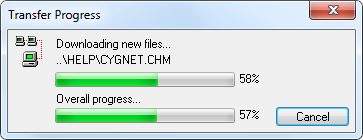
If an update is required, the Version Manager will show a Transfer Progress dialog box for the selected file.
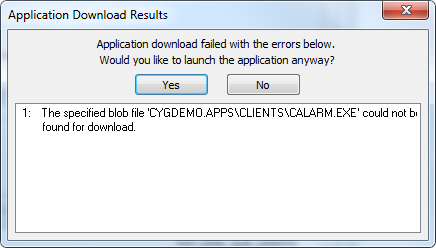
If version management is successful, the application will start. If there are version management errors, a dialog box will show the errors. If a previous copy of the application had been installed, you will be given the option to start the application regardless of the version management failure.
Once the Version Manager finishes its task it shuts down.
A download log file (DownloadLog.txt) file is created in the application directory. It shows the tasks performed as part of version management.
In addition to performing version management on applications, the Version Manager also performs version management on itself and the CygNet Client Installer. If a newer Version Manager exists, the local copy will be renamed BSSVM2.exe then the newer version will be downloaded. Once this task is complete the Version Manager checks the CygNet Client Installer then resumes its tasks for the selected application. The Version Manager and CygNet Client Installer must reside in the BSS from which an application is loaded. Therefore, if you store files to a BSS other than the APPS you must upload BSSVM.exe and CInstall.exe to that BSS.
The Version Manager can also register files, display read-me files, and dialog boxes. These options are described in Version Management Installation Parameters.
More:

|
|
|


