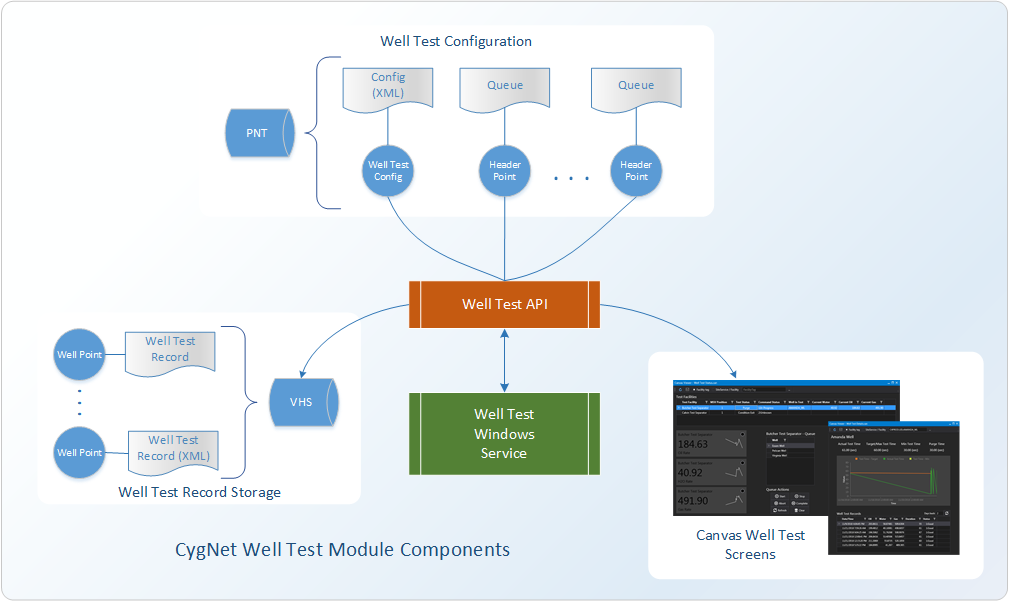
The CygNet Well Test Module is a complex application that integrates several components. The following diagram shows the various components of the module.
Note that this model is only applicable to Host-based devices. A slightly different model is needed for Device-based configurations. Each component is described below, with a link to more information for each.
Click the following image to see the various components of the CygNet Well Test Module:
|
|
| CygNet Well Test Module Components |
See the following subsections for more information:
The CygNet Well Test Module requires the CygNet.API.WellTest assembly, which is used by the back-end CygNet Well Test Windows Service, the well test configuration XML, the Canvas well test screens, and external systems such as ForeSite. It is located in the CygNet\Bin directory and is automatically version managed by Canvas.
The CygNet.API.WellTest has two helper functions that can be used to retrieve well test records:
See Retrieving Well Test Records for an example of these functions.

The CygNet Well Test Module requires the CygNet Well Test Windows Service. This Windows service monitors the well test configuration XML stored in the HyperPoint of the Header Queue point for starts and stops, value changes, and then executes the well test commands and actions.
The service requires a Windows Service config file, which points to the configuration point containing the well test configuration XML. The CygNet Well Test Windows Service Config File (WellTestServiceConfig.xml) takes the following format:
|
<WellTest> <ConfigurationPoints> <Point>SITENAME.UIS:LONG_ID</Point> </ConfigurationPoints> </WellTest> |
The service is installed via CInstall on the host CygNet server and includes an Application Definition File (.app) and Response List File (.rsp) to facilitate version management. The service must be located on the CygNet server and utilizes the CygNet.API.WellTest.
The Well Test Service uses a persistence model to ensure smooth operation of any active well tests should the service shutdown unexpectedly in the middle of a well test operation. When the service starts it reads the XML in the HyperPoint of the configured Header Queue points. The XML includes an <ActiveWell> section and an <ActionQueue> for the well in an active well test.
In the following example AMANDA_WL is the <ActiveWell> and its <ActionQueue> contains several well test actions to be completed. This data is kept updated as changes occur, but not when the service is triggered for shutdown. When the well test service is triggered for shutdown, a list of any remaining actions will be written to the <ActionQueue> element of the header point XML. A list of the remaining wells to be tested is written to the <PendingQueue> element (in this case: ESSEN_WL, PELICAN_WL, and VIRGINIA_WL). When the well test service is triggered to start or restart, the XML configuration will be loaded. The well test service will then look for the existence of an <ActiveWell>, if one exists, any remaining actions will be loaded into the Action Queue for the Well, and the Action Queue will be restarted (in this case: Test, PointValueCompare, SetPoint, and so on…).
|
<WellTestQueue format="2"> <PendingQueue> <Well tag="C4PROD.UIS::ESSEN_WL" status="Pending" /> <Well tag="C4PROD.UIS::PELICAN_WL" status="Pending" /> <Well tag="C4PROD.UIS::VIRGINIA_WL" status="Pending" /> </PendingQueue> <ActiveWell tag="C4PROD.UIS::AMANDA_WL" request="START"> <ActionQueue> <Action type="Test" …> <Action type="PointValueCompare" …> <Action type="SetPoint" … /> <Action type="Test" …> … <Action type="SetPoint" … /> <Action type="Test"…> … <Action type="SetPoint" … /> <Action type="PointValueCompare" …> <Action type="Script" …> <Action type="Exit" … /> <Action type="SetPoint" … /> </ActionQueue> </ActiveWell> </WellTestQueue> |
The CygNet Well Test Module requires a typical CygNet configuration, with defined CygNet facilities, points, UDCs, UIS commands, scheduling commands, etc.
See Configuring CygNet Well Test for more information.
The CygNet.API.WellTest.Controls.dll is a plugin control assembly that can be made available for use in Canvas to allow the manual configuration of the well test configuration XML file. This plugin provides a user-friendly method for defining the necessary elements required to execute a well test via a Canvas screen. Using the control assembly and a configuration screen you can easily define the following well test properties: point scheme, data retention value, relative facilities, UDCs, headers, wells in the well test, header templates, positions, commands, and associated actions for each command.
See Configuring Well Test Using Canvas for more information.
The well test configuration XML contains the following important elements:
The Well Test Configuration XML defines the logical blocks required to perform well test actions. It includes header points, which define the associated wells to be included in the well test sequence, and the relationship of wells to the valves in various positions, and a header queue to monitor multiple headers. The well test configuration is an XML string that is manually written to a configuration point in the PNT as HyperPoint Script Text.
See Configuring Well Test Using XML for more information.
Once the well test action sequence completes, the well test contents must be generated. Since the values for the well test record can come from various locations due to the unique configurations at the field-level, a programmable approach in the form of a VB script is required.
A sample script is available to illustrate the concept of processing supplied arguments and providing the necessary output that the CygNet Well Test Module expects in order to process a well test record. The VB script will need to be customized for the user's environment.
See Processing and Storing Well Test Results for more information.
Well test records are stored as XML strings in VHS entries for each configured well. After the VB script exits processing, the well test data is complete, and the appropriate output is available, the CygNet Well Test Module will create the well test configuration XML record (an XML string) and store it as a BLOB entry in the appropriate VHS point. External systems can also consume the well test records stored in the VHS using the CygNet.API.WellTest API.
See Processing and Storing Well Test Results and Retrieving Well Test Records for more information.
CygNet Well Test Module uses Canvas screens to visualize well test status and detail information. The screens can also be used to initiate an on-demand well test campaign. The sample Canvas screens are included on the CD_Image in the Samples\Well Test folder. The screens will need to be customized for the user’s environment.
See Sample Well Test Screens and Scripts for more information.
|
|
|

