Canvas > Viewing Alarms in Canvas
Viewing Alarms in Canvas
Point alarm information can be displayed and accessed in Canvas in the several ways:
- Any screen viewed in Canvas View and Canvas View Lite that is configured to display the Alarm Notifier will display all active (unacknowledged) alarms. Information about each alarm is accessible from customizable links within alarm notifier.
- Any control that can be configured to show attributes of a primary point can be configured to show point status information in addition to the point property. For example, a Text Tool can show a point’s value in its label and reflect the point state in its background color.
- Any control that can be configured to show primary point attributes, and that point's current value meets or exceeds the alarm setpoint, will display the point in alarm.
- Any control shown to be in alarm can be right-clicked in run mode to acknowledge the point’s alarm from the object's context menu. You can also view the point’s alarm settings and alarm history from the context menu.
CygNet Alarm Configuration
CygNet alarms are configured in the point configuration record for each point type in the Point Service (PNT). Alarm bits and alarm reporting can be enabled for any point in the system. Alarm notification is configured in the General Notification Service (GNS). The following items must be considered when configuring alarms for a point: Setpoint value, Alarm category, Alarm suppression, Alarm calculation, Alarm priority, Reporting to the Common Alarm Service (CAS), Reporting to the General Notification Service (GNS), Alarm delay, Alarm deadband (analog points only), and Alarm notification recipients (primary, secondary, tertiary).
Alarm Settings
Several Canvas objects provide access to the point properties associated with Alarm Settings for a selected point via the right-click context menu in run mode. Select Point Configuration > on the context menu to view and/or edit various point configuration record properties for the selected point. These properties can also be manipulated via script using the COM API exposed through the CxPnt.dll or the CygNet .NET API through the CygNet.API.Points namespace.
Acknowledging Alarms
When an alarm is reported to the CAS, its state is "unacknowledged", meaning that the alarm is new and that a user or the system has not acknowledged its presence. An unacknowledged alarm may be identified by the color settings for the control (background, text, border, ring, bar, fill, or marker color), if configured to represent the point state of the associated point. Additionally, some controls may blink to warn of a point in alarm, if configured to do so.
|
Acknowledge the alarm from the context menu:
- Select the object when it is displaying an alarm color or blink action. Some controls can be configured to blink to indicate that the object's point has an unacknowledged alarm.
- Right-click the object and select Acknowledge alarm from the context menu. The Acknowledge alarm option is removed once the alarm is acknowledged.
See the control properties for more information about configuring alarm acknowledgment options.
|
|
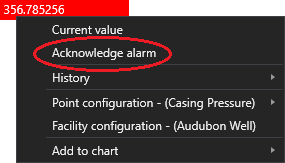
Grid cell context menu
|
Additional Resources
CygNet Help: For more information about configuration, setting, and properties of CygNet alarms see the following topics in the CygNet Help:
Also refer to the following topics in the CygNet.API Help for more information:
- CygNet.API.Alarms Namespace
- CygNet.API.Points Namespace
In this section
This section describes how to view alarms in Canvas and includes the following topics:

