Combo Box Items
Combo Box Items
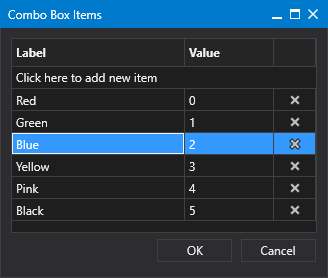
Sample Combo Box Items dialog box
Click
to open
Combo Box Items
dialog box.
Click in the area titled
Click here to add new...
to add a new item for the drop-down menu.
Type a
Label
name and press enter. The
Label
property specifies the label for an item in the combo box drop-down menu.
Type a
Value
for this item, if required. The
Value
property specifies the value for the item in the combo box drop-down menu.
Rows can be easily reordered by
dragging and dropping
an item to a new location in the list.
Click
(
Delete row
) to remove a selected row.
Once the list is configured, click
OK
to save.
Or click
Cancel
to abort and close the
Combo Box Items
dialog box.
©
2020
Weatherford. All rights reserved.
 to open Combo Box Items dialog box.
 (Delete row) to remove a selected row.
