|
CygNet Property String dialog box |
Use the CygNet Property String dialog box to build a dynamic text string, based on real-time CVS point properties, point configuration properties, and facility properties, using text tokens to represent a CygNet point attribute. In run mode, the tokens are replaced with the actual item.
In the example below, the Text property for a control is configured as
%Description% is %Value% %Units% at %Timestamp%
which corresponds to the description of the point, the point value, its units, and timestamp. The items wrapped in the percent signs are tokens and will be replaced in run mode with the dynamic values. For example:
Gas Flow Rate is 1,033.41 MCFH at 2019/09/12 12:00:00.000
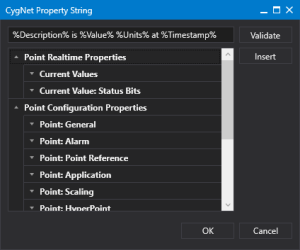
CygNet Property String dialog box
 to see the point attributes for all CygNet points, grouped by point real-time properties, point configuration properties, and facility properties.
CygNet Help: For more information about using text tokens and dynamic text creation, see the Using Text Tokens topic in the CygNet Help: